2023. 10. 6. 11:28ㆍdocker
python
- 파일 생성


- 이미지 빌드
docker build -t helloworld .
현재 디렉토리에서 Dockerfile을 찾아서 해당 Dockerfile을 기반으로 helloworld 이미지를 빌드하고,
이 이미지에 helloworld라는 태그를 붙인다.

- script 실행
docker run helloworld

nodejs
- 패키지 설치
curl -sL https://deb.nodesource.com/setup_16.x | sudo -E bash -
sudo apt-get install -y nodejs
sudo npm install -g express
sudo npm install -g express-generator
npm init -y
npm i express
- 파일 생성
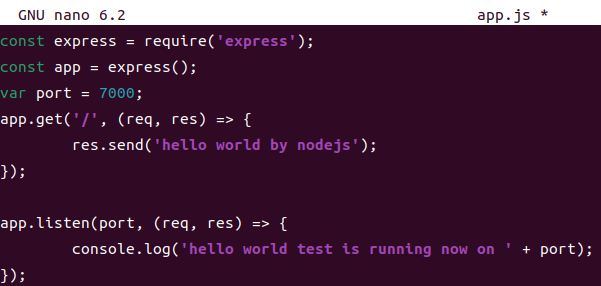
const express = require('express');
const app = express();
var port = 7000;
app.get('/', (req, res) => {
res.send('hello world by nodejs');
});
app.listen(port, (req, res) => {
console.log('hello world test is running now on ' + port);
});
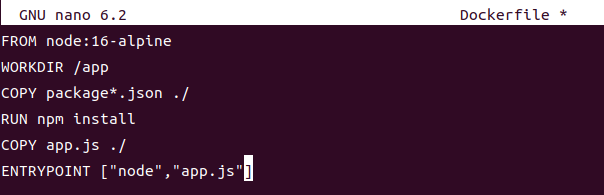
FROM node:16-alpine
WORKDIR /app
COPY package*.json ./
RUN npm install
COPY app.js ./
ENTRYPOINT ["node","app.js"]
- 이미지 빌드
docker build -t nodejs:1.0 .

- 도커 실행
docker run -d -p 8080:7000 nodejs:1.0



'docker' 카테고리의 다른 글
| nodejs 실습 (0) | 2023.10.06 |
|---|---|
| Docker commit (0) | 2023.10.06 |
| volume (0) | 2023.10.05 |
| dockerhub 활용 (0) | 2023.10.05 |
| network (0) | 2023.10.05 |