참고문서
https://kubernetes.io/docs/concepts/workloads/autoscaling/vertical-pod-autoscale/
Vertical Pod Autoscaling
In Kubernetes, a VerticalPodAutoscaler automatically updates a workload management resource (such as a Deployment or StatefulSet), with the aim of automatically adjusting infrastructure resource requests and limits to match actual usage. Vertical scaling m
kubernetes.io
https://github.com/kubernetes/autoscaler/tree/master/vertical-pod-autoscaler
autoscaler/vertical-pod-autoscaler at master · kubernetes/autoscaler
Autoscaling components for Kubernetes. Contribute to kubernetes/autoscaler development by creating an account on GitHub.
github.com
VPA 설치
HPA와는 다르게 VPA는 별도 설치를 해야 사용이 가능하다.
git clone https://github.com/kubernetes/autoscaler.git
cd autoscaler/vertical-pod-autoscaler
./hack/vpa-up.sh
아래와 같이 설치여부를 확인
[root@k8s-master vertical-pod-autoscaler]# k get po -n kube-system | grep vpa
vpa-admission-controller-77f9b89f68-7dgkn   1/1     Running   0          115s
vpa-recommender-74477d86cf-h6dj8            1/1     Running   0          116s
vpa-updater-c4b976bd8-9rs6m                 1/1     Running   0          116s
아래 명령어로 각 파드의 에러 여부 확인 가능
kubectl --namespace=kube-system logs [pod name]| grep -e '^E[0-9]\{4\}'
VPA 실습
아래 yaml을 적용하여 VPA 생성
apiVersion: autoscaling.k8s.io/v1
kind: VerticalPodAutoscaler
metadata:
  name: hello-app
spec:
  targetRef:
    apiVersion: "apps/v1"
    kind: Deployment
    name: hello-app
  updatePolicy:
    updateMode: "Off"
추천 리소스가 확인되니 성공!
[root@k8s-master ~]# k describe vpa hello-app
Name:         hello-app
Namespace:    default
Labels:       <none>
Annotations:  <none>
API Version:  autoscaling.k8s.io/v1
Kind:         VerticalPodAutoscaler
Metadata:
  Creation Timestamp:  2025-12-26T02:36:50Z
  Generation:          1
  Resource Version:    216299
  UID:                 48e87a76-b0f2-4fb5-a8d4-5d56d52b948a
Spec:
  Target Ref:
    API Version:  apps/v1
    Kind:         Deployment
    Name:         hello-app
  Update Policy:
    Update Mode:  Off
Status:
  Conditions:
    Last Transition Time:  2025-12-26T0:37:03Z
    Status:                True
    Type:                  RecommendationProvided
  Recommendation:
    Container Recommendations:
      Container Name:  hello-app
      Lower Bound:
        Cpu:     25m
        Memory:  250Mi
      Target:
        Cpu:     25m
        Memory:  250Mi
      Uncapped Target:
        Cpu:     25m
        Memory:  250Mi
      Upper Bound:
        Cpu:     193m
        Memory:  414455793
아래와 같이 updateMode를 바꿔 적용해보자
  updatePolicy:
    updateMode: "Auto"
Auto는 deprecated 될 것임을 알 수 있었다.
[root@k8s-master ~]# k apply -f vpa.yaml
Warning: UpdateMode "Auto" is deprecated and will be removed in a future API version. Use explicit update modes like "Recreate", "Initial", or "InPlaceOrRecreate" instead. See https://github.com/kubernetes/autoscaler/issues/8424 for more details.
verticalpodautoscaler.autoscaling.k8s.io/hello-app configured
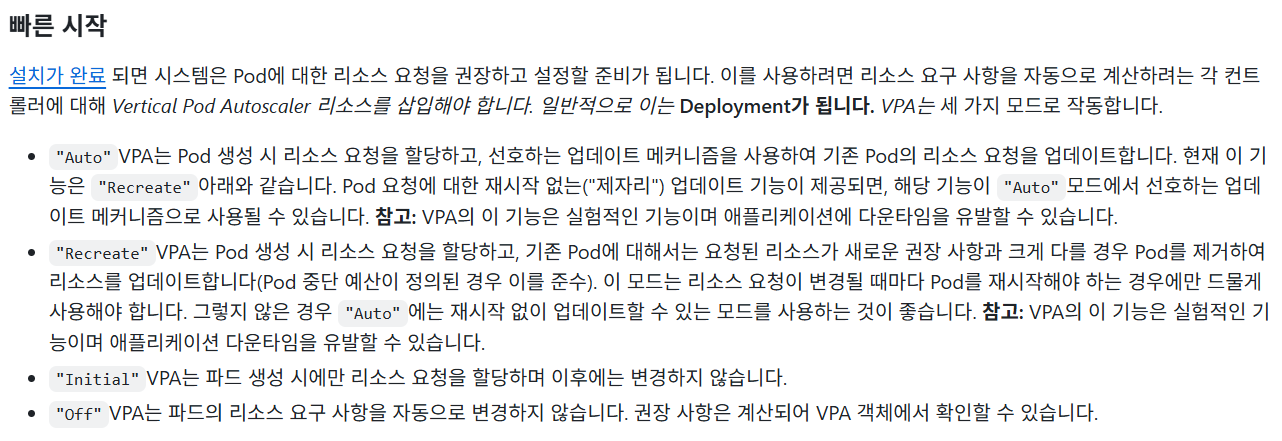
추가로 각 mode에 대한 설명을 github에서 아래와 같이 확인할 수 있었다.
Auto와 InPlaceOrRecreate는 결국 같은 모드이지만 의미의 명확성을 위해 이름을 바꾼 것 같다.
 |
아래와 같이 InPlaceOrRecreate도 잘 적용됨을 확인할 수 있다.
[root@k8s-master ~]# k get vpa
NAME        MODE                CPU   MEM     PROVIDED   AGE
hello-app   InPlaceOrRecreate   25m   250Mi   True       3h3m
또한 추천하는 리소스대로 파드도 재생성되었다.
여기서 Upper Bound가 limit에 적용될 것을 기대했지만 적용되지는 않았다.
[root@k8s-master ~]# k get deploy hello-app -o jsonpath="{.spec.template.spec.containers[*].resources}"
{"requests":{"cpu":"100m","memory":"200Mi"}}

[root@k8s-master ~]# k get po
NAME                          READY   STATUS      RESTARTS   AGE
hello-app-76f76c9cc8-bl6qh    1/1     Running     0          40m
hello-app-76f76c9cc8-z8992    1/1     Running     0          41m

[root@k8s-master ~]# k get po hello-app-76f76c9cc8-bl6qh -o jsonpath="{.spec.containers[*].resources}"
{"requests":{"cpu":"25m","memory":"250Mi"}}

[root@k8s-master ~]# k get po hello-app-76f76c9cc8-z8992 -o jsonpath="{.spec.containers[*].resources}"
{"requests":{"cpu":"25m","memory":"250Mi"}}
부하 테스트
HPA에서 적용했던 부하 테스트를 진행 시 아래와 같이 Histogram이 측정되었다.
[root@k8s-master ~]# k describe vpacheckpoint hello-app-hello-app
Name:         hello-app-hello-app
Namespace:    default
Labels:       <none>
Annotations:  <none>
API Version:  autoscaling.k8s.io/v1
Kind:         VerticalPodAutoscalerCheckpoint
Metadata:
  Creation Timestamp:  2025-12-26T02:37:02Z
  Generation:          167
  Resource Version:    236405
  UID:                 106ad508-c1c1-4aa9-9e8f-8f63d461d0f2
Spec:
  Container Name:   hello-app
  Vpa Object Name:  hello-app
Status:
  Cpu Histogram:
    Bucket Weights:
      0:                  10000
      1:                  272
      10:                 30
      13:                 30
      2:                  303
      3:                  91
      4:                  30
      5:                  182
      6:                  61
      7:                  61
      8:                  122
      9:                  61
    Reference Timestamp:  2025-12-26T00:00:00Z
    Total Weight:         43.054345325212154
  First Sample Start:     2025-12-26T02:09:49Z
  Last Sample Start:      2025-12-26T05:22:51Z
  Last Update Time:       2025-12-26T05:23:03Z
  Memory Histogram:
    Bucket Weights:
      1:                  10000
      6:                  6844
    Reference Timestamp:  2025-12-27T00:00:00Z
    Total Weight:         5.5309391895116535
  Total Samples Count:    386
  Version:                v3
Events:                   <none>
이에 따라 Upper Bound가 수정된 것도 확인 가능하다.
[root@k8s-master ~]# k describe vpa hello-app
Name:         hello-app
Namespace:    default
Labels:       <none>
Annotations:  <none>
API Version:  autoscaling.k8s.io/v1
Kind:         VerticalPodAutoscaler
Metadata:
  Creation Timestamp:  2025-12-26T02:36:50Z
  Generation:          4
  Resource Version:    237418
  UID:                 48e87a76-b0f2-4fb5-a8d4-5d56d52b948a
Spec:
  Target Ref:
    API Version:  apps/v1
    Kind:         Deployment
    Name:         hello-app
  Update Policy:
    Update Mode:  Recreate
Status:
  Conditions:
    Last Transition Time:  2025-12-26T02:37:03Z
    Status:                True
    Type:                  RecommendationProvided
  Recommendation:
    Container Recommendations:
      Container Name:  hello-app
      Lower Bound:
        Cpu:     25m
        Memory:  250Mi
      Target:
        Cpu:     25m
        Memory:  250Mi
      Uncapped Target:
        Cpu:     25m
        Memory:  250Mi
      Upper Bound:
        Cpu:     405m
Memory: 775174755'k8s' 카테고리의 다른 글
| Cilium 설치 (0) | 2026.02.03 |
|---|---|
| HPA (0) | 2025.12.15 |
| metric server 설치 (0) | 2025.09.02 |
| node join 및 delete (0) | 2025.08.28 |
| ansible 을 활용한 k8s 클러스터 구축 (0) | 2025.08.01 |