시나리오
사용자 → QueryPie 로그인
        → Okta (OIDC)
        → ID Token 발급
        → Group Claim 확인
        → 접근 허용 / 차단
OIDC Application 생성
resource "okta_app_oauth" "querypie_oidc" {
  label = "QueryPie-OIDC"

  type = "web"

  grant_types = [
    "authorization_code"
  ]

  redirect_uris = [
    "https://querypie.example.com/oauth/callback"
  ]

  response_types = [
    "code"
  ]

  token_endpoint_auth_method = "client_secret_basic"
}
App ↔ Group 할당
resource "okta_app_group_assignment" "querypie_admin_access" {
  app_id  = okta_app_oauth.querypie.id
  group_id = okta_group.k8s_admins.id
}

resource "okta_app_group_assignment" "querypie_readonly_access" {
  app_id  = okta_app_oauth.querypie.id
  group_id = okta_group.k8s_readonly.id
}
QueryPie OIDC 앱 정의
resource "okta_app_oauth" "querypie" {
  label                      = "QueryPie"
  type                       = "web"
  grant_types                = ["authorization_code"]
  response_types             = ["code"]
  token_endpoint_auth_method = "client_secret_basic"

  redirect_uris = [
    "https://querypie.example.com/oauth/callback"
  ]

  post_logout_redirect_uris = [
    "https://querypie.example.com/logout"
  ]
}
OpenToFu 실행
[root@k8s-master terraform-access-control]# tofu plan
okta_user.user_readonly: Refreshing state... [id=00uyqkkr0zYwrqaiA697]
okta_group.k8s_readonly: Refreshing state... [id=00gypu3w4aLdzWj86697]
okta_group.k8s_admins: Refreshing state... [id=00gypu0d5yYlmpq6d697]
okta_user.user_admin: Refreshing state... [id=00uyqkipnrb2GMobo697]
okta_group_memberships.admin_membership: Refreshing state... [id=00gypu0d5yYlmpq6d697]
okta_group_memberships.readonly_membership: Refreshing state... [id=00gypu3w4aLdzWj86697]

OpenTofu used the selected providers to generate the following execution plan. Resource actions are indicated with the following symbols:
  + create

OpenTofu will perform the following actions:

  # okta_app_group_assignment.querypie_admin_access will be created
  + resource "okta_app_group_assignment" "querypie_admin_access" {
      + app_id            = (known after apply)
      + group_id          = "00gypu0d5yYlmpq6d697"
      + id                = (known after apply)
      + retain_assignment = false
    }

  # okta_app_group_assignment.querypie_readonly_access will be created
  + resource "okta_app_group_assignment" "querypie_readonly_access" {
      + app_id            = (known after apply)
      + group_id          = "00gypu3w4aLdzWj86697"
      + id                = (known after apply)
      + retain_assignment = false
    }

  # okta_app_oauth.querypie will be created
  + resource "okta_app_oauth" "querypie" {
      + accessibility_self_service = false
      + authentication_policy      = (known after apply)
      + auto_key_rotation          = true
      + auto_submit_toolbar        = false
      + client_id                  = (known after apply)
      + client_secret              = (sensitive value)
      + consent_method             = "TRUSTED"
      + grant_types                = [
          + "authorization_code",
        ]
      + hide_ios                   = true
      + hide_web                   = true
      + id                         = (known after apply)
      + issuer_mode                = "ORG_URL"
      + label                      = "QueryPie"
      + login_mode                 = "DISABLED"
      + logo_url                   = (known after apply)
      + name                       = (known after apply)
      + omit_secret                = false
      + pkce_required              = (known after apply)
      + post_logout_redirect_uris  = [
          + "https://querypie.example.com/logout",
        ]
      + redirect_uris              = [
          + "https://querypie.example.com/oauth/callback",
        ]
      + refresh_token_leeway       = 0
      + refresh_token_rotation     = "STATIC"
      + response_types             = [
          + "code",
        ]
      + sign_on_mode               = (known after apply)
      + status                     = "ACTIVE"
      + token_endpoint_auth_method = "client_secret_basic"
      + type                       = "web"
      + user_name_template         = "${source.login}"
      + user_name_template_type    = "BUILT_IN"
      + wildcard_redirect          = "DISABLED"
    }

  # okta_app_oauth.querypie_oidc will be created
  + resource "okta_app_oauth" "querypie_oidc" {
      + accessibility_self_service = false
      + authentication_policy      = (known after apply)
      + auto_key_rotation          = true
      + auto_submit_toolbar        = false
      + client_id                  = (known after apply)
      + client_secret              = (sensitive value)
      + consent_method             = "TRUSTED"
      + grant_types                = [
          + "authorization_code",
        ]
      + hide_ios                   = true
      + hide_web                   = true
      + id                         = (known after apply)
      + issuer_mode                = "ORG_URL"
      + label                      = "QueryPie-OIDC"
      + login_mode                 = "DISABLED"
      + logo_url                   = (known after apply)
      + name                       = (known after apply)
      + omit_secret                = false
      + pkce_required              = (known after apply)
      + redirect_uris              = [
          + "https://querypie.example.com/oauth/callback",
        ]
      + refresh_token_leeway       = 0
      + refresh_token_rotation     = "STATIC"
      + response_types             = [
          + "code",
        ]
      + sign_on_mode               = (known after apply)
      + status                     = "ACTIVE"
      + token_endpoint_auth_method = "client_secret_basic"
      + type                       = "web"
      + user_name_template         = "${source.login}"
      + user_name_template_type    = "BUILT_IN"
      + wildcard_redirect          = "DISABLED"
    }

Plan: 4 to add, 0 to change, 0 to destroy.

─────────────────────────────────────────────────────────────────────────────────────────────────────────────────────────────────────────────────────────────────────────────────────────────────────────────────────────────────────

Note: You didn't use the -out option to save this plan, so OpenTofu can't guarantee to take exactly these actions if you run "tofu apply" now.
[root@k8s-master terraform-access-control]# tofu apply
okta_group.k8s_admins: Refreshing state... [id=00gypu0d5yYlmpq6d697]
okta_group.k8s_readonly: Refreshing state... [id=00gypu3w4aLdzWj86697]
okta_user.user_admin: Refreshing state... [id=00uyqkipnrb2GMobo697]
okta_user.user_readonly: Refreshing state... [id=00uyqkkr0zYwrqaiA697]
okta_group_memberships.readonly_membership: Refreshing state... [id=00gypu3w4aLdzWj86697]
okta_group_memberships.admin_membership: Refreshing state... [id=00gypu0d5yYlmpq6d697]

OpenTofu used the selected providers to generate the following execution plan. Resource actions are indicated with the following symbols:
  + create

OpenTofu will perform the following actions:

  # okta_app_group_assignment.querypie_admin_access will be created
  + resource "okta_app_group_assignment" "querypie_admin_access" {
      + app_id            = (known after apply)
      + group_id          = "00gypu0d5yYlmpq6d697"
      + id                = (known after apply)
      + retain_assignment = false
    }

  # okta_app_group_assignment.querypie_readonly_access will be created
  + resource "okta_app_group_assignment" "querypie_readonly_access" {
      + app_id            = (known after apply)
      + group_id          = "00gypu3w4aLdzWj86697"
      + id                = (known after apply)
      + retain_assignment = false
    }

  # okta_app_oauth.querypie will be created
  + resource "okta_app_oauth" "querypie" {
      + accessibility_self_service = false
      + authentication_policy      = (known after apply)
      + auto_key_rotation          = true
      + auto_submit_toolbar        = false
      + client_id                  = (known after apply)
      + client_secret              = (sensitive value)
      + consent_method             = "TRUSTED"
      + grant_types                = [
          + "authorization_code",
        ]
      + hide_ios                   = true
      + hide_web                   = true
      + id                         = (known after apply)
      + issuer_mode                = "ORG_URL"
      + label                      = "QueryPie"
      + login_mode                 = "DISABLED"
      + logo_url                   = (known after apply)
      + name                       = (known after apply)
      + omit_secret                = false
      + pkce_required              = (known after apply)
      + post_logout_redirect_uris  = [
          + "https://querypie.example.com/logout",
        ]
      + redirect_uris              = [
          + "https://querypie.example.com/oauth/callback",
        ]
      + refresh_token_leeway       = 0
      + refresh_token_rotation     = "STATIC"
      + response_types             = [
          + "code",
        ]
      + sign_on_mode               = (known after apply)
      + status                     = "ACTIVE"
      + token_endpoint_auth_method = "client_secret_basic"
      + type                       = "web"
      + user_name_template         = "${source.login}"
      + user_name_template_type    = "BUILT_IN"
      + wildcard_redirect          = "DISABLED"
    }

  # okta_app_oauth.querypie_oidc will be created
  + resource "okta_app_oauth" "querypie_oidc" {
      + accessibility_self_service = false
      + authentication_policy      = (known after apply)
      + auto_key_rotation          = true
      + auto_submit_toolbar        = false
      + client_id                  = (known after apply)
      + client_secret              = (sensitive value)
      + consent_method             = "TRUSTED"
      + grant_types                = [
          + "authorization_code",
        ]
      + hide_ios                   = true
      + hide_web                   = true
      + id                         = (known after apply)
      + issuer_mode                = "ORG_URL"
      + label                      = "QueryPie-OIDC"
      + login_mode                 = "DISABLED"
      + logo_url                   = (known after apply)
      + name                       = (known after apply)
      + omit_secret                = false
      + pkce_required              = (known after apply)
      + redirect_uris              = [
          + "https://querypie.example.com/oauth/callback",
        ]
      + refresh_token_leeway       = 0
      + refresh_token_rotation     = "STATIC"
      + response_types             = [
          + "code",
        ]
      + sign_on_mode               = (known after apply)
      + status                     = "ACTIVE"
      + token_endpoint_auth_method = "client_secret_basic"
      + type                       = "web"
      + user_name_template         = "${source.login}"
      + user_name_template_type    = "BUILT_IN"
      + wildcard_redirect          = "DISABLED"
    }

Plan: 4 to add, 0 to change, 0 to destroy.

Do you want to perform these actions?
  OpenTofu will perform the actions described above.
  Only 'yes' will be accepted to approve.

  Enter a value: yes

okta_app_oauth.querypie_oidc: Creating...
okta_app_oauth.querypie: Creating...
okta_app_oauth.querypie_oidc: Creation complete after 2s [id=0oayqnz1oust7db4y697]
okta_app_oauth.querypie: Creation complete after 2s [id=0oayqnzjf6dk2eKYE697]
okta_app_group_assignment.querypie_readonly_access: Creating...
okta_app_group_assignment.querypie_admin_access: Creating...
okta_app_group_assignment.querypie_admin_access: Creation complete after 1s [id=00gypu0d5yYlmpq6d697]
okta_app_group_assignment.querypie_readonly_access: Creation complete after 1s [id=00gypu3w4aLdzWj86697]

Apply complete! Resources: 4 added, 0 changed, 0 destroyed.
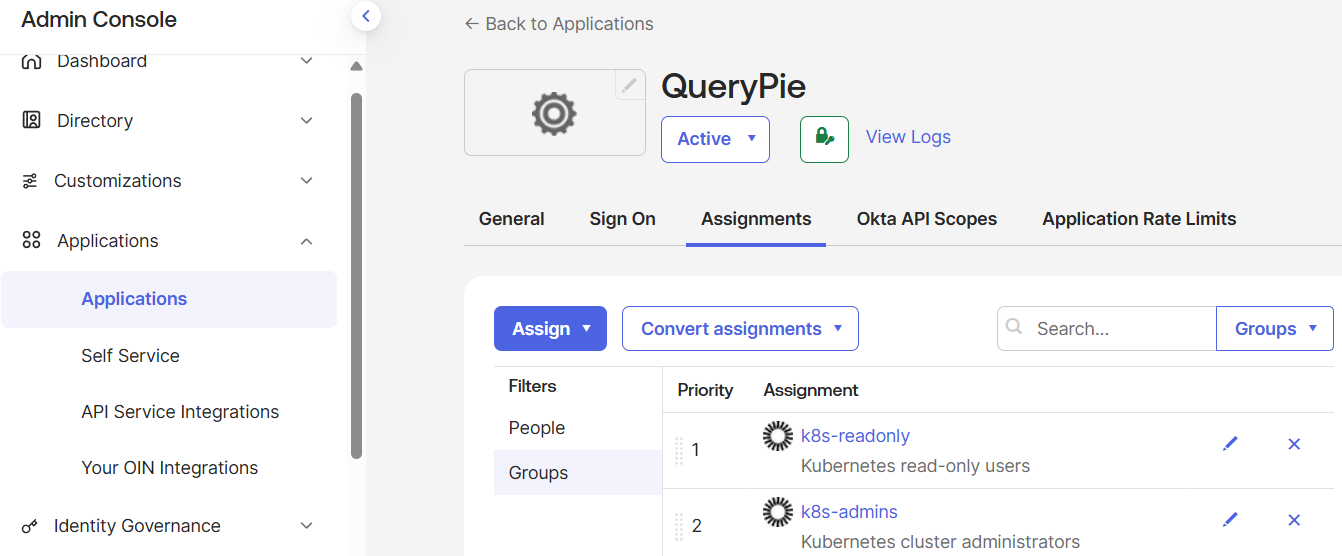
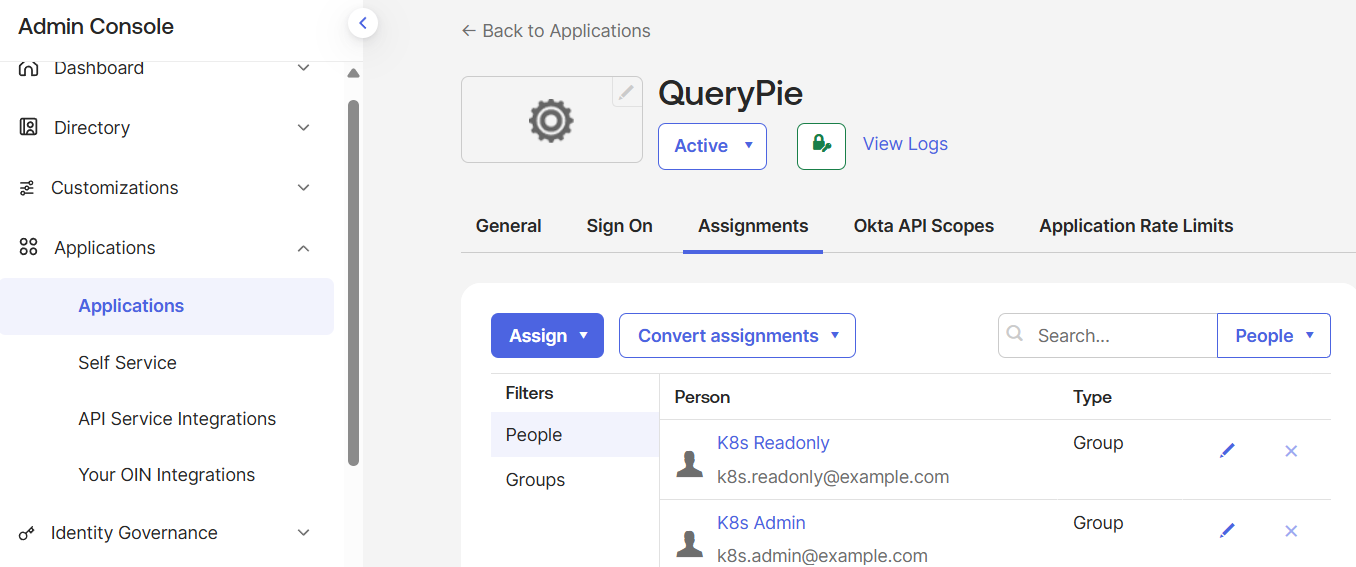
Console 확인
 |
 |
QueryPie 연동의 실제 흐름
[사용자]
   ↓ (Okta Dashboard 클릭)
QueryPie  ← 여기서만 People / Group 할당 필요
   ↓ (Redirect)
QueryPie-OIDC (OIDC Client)
   ↓
Okta Authorization Server
   ↓
ID Token / Access Token 발급 (groups 포함)
   ↓
QueryPie Backend
# README.md
## OIDC Application Integration (QueryPie Scenario)

- Okta를 Identity Provider(IdP)로 사용
- OIDC 기반 Application 생성
- 그룹 기반 App 접근제어 구현
- QueryPie 등 접근제어 솔루션 연동 가능한 구조 설계'Okta+QueryPie+k8s' 카테고리의 다른 글
| QueryPie ACP Community Edition 구축 (0) | 2026.01.05 |
|---|---|
| QueryPie 구축(K8s) (0) | 2025.12.31 |
| Okta User 생성 + Group 맵핑 자동화 (0) | 2025.12.29 |
| Okta IAM 자동화 (1) | 2025.12.29 |
| opentofu 설치 (0) | 2025.12.29 |