참고 문서
https://docs.querypie.com/ko/administrator-manual/kubernetes
Kubernetes - QueryPie ACP
QueryPie ACP
docs.querypie.com
https://docs.querypie.com/ko/user-manual/multi-agent
Multi Agent - QueryPie ACP
QueryPie ACP
docs.querypie.com
참고 문서를 따라 연동을 진행하면 아래 흐름 요약과 같이 User가 여러 k8s 클러스터에 접근이 가능하다.
이 프로젝트에서 User는 VMware가 설치된 Windows 환경이고 QueryPie와 k8s 클러스터는 VMware로 띄워 진행하였다.
하면서 특별히 진행하며 막혔던 부분을 Trouble Shooting으로 남겨놓는다.
흐름 요약
[User]
  ↓ Okta SAML
[QueryPie]
  ↓ (KAC Policy)
[Kubernetes API Server]
  ↓
[k8s-master:6443]
Trouble Shooting1
 |
모든 설정을 마친 후 agent의 설명에 따라 kubeconfig를 받았왔지만
customer.kac-proxy.domain 이라는 낯선 도메인의 host를 resolve 못 하여 kube apiserver에 접근을 못 하였다.
 |
흐름 요약에 있는 다이어그램을 고려하면
customer.kac-proxy.domain 라는 도메인은 결국 QueryPie가 설치되어 있는 서버임을 알 수 있다.
실제로 해당 서버의 6443 포트를 사용하는 프로세스가 proxy로 사용되는 것을 확인할 수 있었다.
C:\Windows\System32\drivers\etc\hostsUser에 해당하는 서버에서 host 명을 resolve 할 수 있도록 hosts 파일에 아래와 같이 정보를 기입하였다.
 |
Trouble Shooting2
 |
첫번째 이슈가 해결되자 이번에는 Okta의 유저에 대한 권한이 부족하여 pod 정보를 받지 못했다.
[root@k8s-master ~]# k describe clusterrolebindings.rbac.authorization.k8s.io querypie-crb
Name:         querypie-crb
Labels:       <none>
Annotations:  <none>
Role:
  Kind:  ClusterRole
  Name:  querypie-role
Subjects:
  Kind            Name         Namespace
  ----            ----         ---------
  ServiceAccount  querypie-sa  querypie
[root@k8s-master ~]# k describe clusterrole querypie-role
Name:         querypie-role
Labels:       <none>
Annotations:  <none>
PolicyRule:
  Resources        Non-Resource URLs  Resource Names  Verbs
  ---------        -----------------  --------------  -----
  groups           []                 []              [impersonate]
  serviceaccounts  []                 []              [impersonate]
  users            []                 []              [impersonate]
manual에서 생성했던 querypie-sa에 부여된 clusterrole을 확인하면 impersonate로 동작함을 알 수 있다.
따라서 Okta 유저에 대한 권한이 따로 필요한 듯 하다.
[root@k8s-master ~]# k describe clusterrolebindings.rbac.authorization.k8s.io qp-user-k8s-admin-cluster-admin
Name:         qp-user-k8s-admin-cluster-admin
Labels:       <none>
Annotations:  <none>
Role:
  Kind:  ClusterRole
  Name:  cluster-admin
Subjects:
  Kind  Name       Namespace
  ----  ----       ---------
  User  K8s Admin
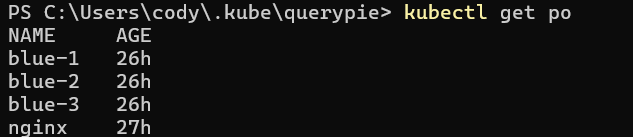
이렇게 권한을 부여 후에는 아래 사진과 같이 kubectl 명령어를 자유롭게 사용할 수 있었다.
 |
KAC
여기서 KAC의 유효성에 대해 확인하고자 한다.
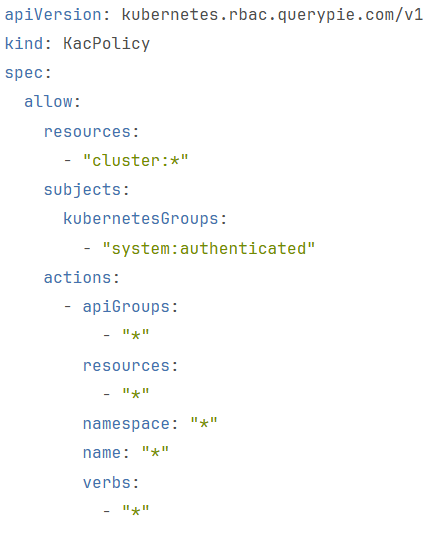
k8s admin 유저는 아래와 같이 KAC policy를 적용했기 때문에 모든 조회가 가능했다.
 |
하지만 k8s readonly 유저 같은 경우 같은 clusterrole을 binding 했음에도
[root@k8s-master ~]# k describe clusterrolebindings.rbac.authorization.k8s.io qp-user-k8s-cluster
Name:         qp-user-k8s-cluster
Labels:       <none>
Annotations:  <none>
Role:
  Kind:  ClusterRole
  Name:  cluster-admin
Subjects:
  Kind  Name          Namespace
  ----  ----          ---------
  User  K8s Readonly
아래와 같은 KAC Policy를 사용했기 때문에
default 네임 스페이스에서 blue-*에 해당하는 파드 정보만 조회할 수 있었다.
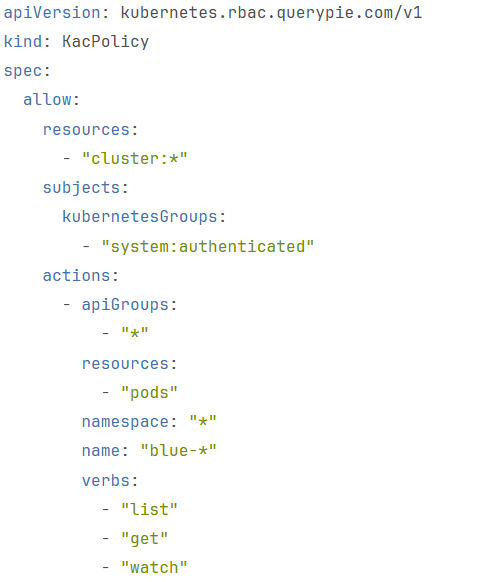 |
결과적으로 KAC는 k8s에 도달하기 전 요청한 내용을 걸러 내는 것을 알 수 있었다.
'Okta+QueryPie+k8s' 카테고리의 다른 글
| Okta + SAML → QueryPie 로그인 (0) | 2026.01.06 |
|---|---|
| QueryPie ACP Community Edition 구축 (0) | 2026.01.05 |
| QueryPie 구축(K8s) (0) | 2025.12.31 |
| Okta OIDC Application 생성 (0) | 2025.12.30 |
| Okta User 생성 + Group 맵핑 자동화 (0) | 2025.12.29 |