시나리오
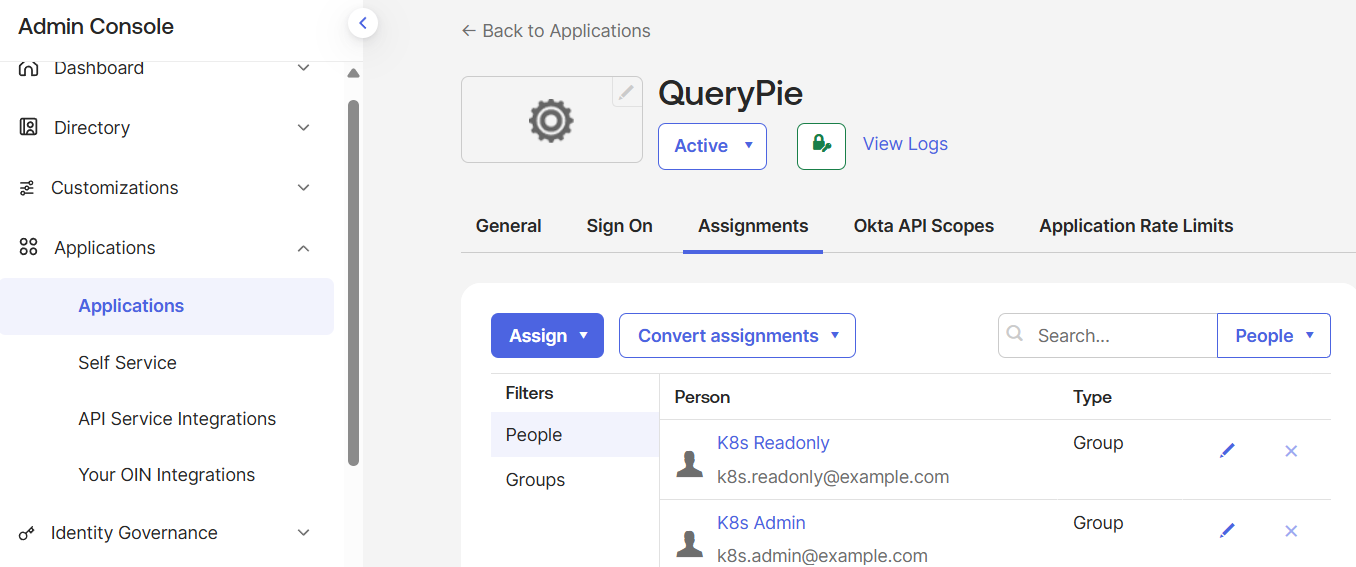
사용자 → QueryPie 로그인
        → Okta (OIDC)
        → ID Token 발급
        → Group Claim 확인
        → 접근 허용 / 차단


OIDC Application 생성
resource "okta_app_oauth" "querypie_oidc" {
  label = "QueryPie-OIDC"

  type = "web"

  grant_types = [
    "authorization_code"
  ]

  redirect_uris = [
    "https://querypie.example.com/oauth/callback"
  ]

  response_types = [
    "code"
  ]

  token_endpoint_auth_method = "client_secret_basic"
}


App ↔ Group 할당
resource "okta_app_group_assignment" "querypie_admin_access" {
  app_id  = okta_app_oauth.querypie.id
  group_id = okta_group.k8s_admins.id
}

resource "okta_app_group_assignment" "querypie_readonly_access" {
  app_id  = okta_app_oauth.querypie.id
  group_id = okta_group.k8s_readonly.id
}


QueryPie OIDC 앱 정의
resource "okta_app_oauth" "querypie" {
  label                      = "QueryPie"
  type                       = "web"
  grant_types                = ["authorization_code"]
  response_types             = ["code"]
  token_endpoint_auth_method = "client_secret_basic"

  redirect_uris = [
    "https://querypie.example.com/oauth/callback"
  ]

  post_logout_redirect_uris = [
    "https://querypie.example.com/logout"
  ]
}


OpenToFu 실행
[root@k8s-master terraform-access-control]# tofu plan
okta_user.user_readonly: Refreshing state... [id=00uyqkkr0zYwrqaiA697]
okta_group.k8s_readonly: Refreshing state... [id=00gypu3w4aLdzWj86697]
okta_group.k8s_admins: Refreshing state... [id=00gypu0d5yYlmpq6d697]
okta_user.user_admin: Refreshing state... [id=00uyqkipnrb2GMobo697]
okta_group_memberships.admin_membership: Refreshing state... [id=00gypu0d5yYlmpq6d697]
okta_group_memberships.readonly_membership: Refreshing state... [id=00gypu3w4aLdzWj86697]

OpenTofu used the selected providers to generate the following execution plan. Resource actions are indicated with the following symbols:
  + create

OpenTofu will perform the following actions:

  # okta_app_group_assignment.querypie_admin_access will be created
  + resource "okta_app_group_assignment" "querypie_admin_access" {
      + app_id            = (known after apply)
      + group_id          = "00gypu0d5yYlmpq6d697"
      + id                = (known after apply)
      + retain_assignment = false
    }

  # okta_app_group_assignment.querypie_readonly_access will be created
  + resource "okta_app_group_assignment" "querypie_readonly_access" {
      + app_id            = (known after apply)
      + group_id          = "00gypu3w4aLdzWj86697"
      + id                = (known after apply)
      + retain_assignment = false
    }

  # okta_app_oauth.querypie will be created
  + resource "okta_app_oauth" "querypie" {
      + accessibility_self_service = false
      + authentication_policy      = (known after apply)
      + auto_key_rotation          = true
      + auto_submit_toolbar        = false
      + client_id                  = (known after apply)
      + client_secret              = (sensitive value)
      + consent_method             = "TRUSTED"
      + grant_types                = [
          + "authorization_code",
        ]
      + hide_ios                   = true
      + hide_web                   = true
      + id                         = (known after apply)
      + issuer_mode                = "ORG_URL"
      + label                      = "QueryPie"
      + login_mode                 = "DISABLED"
      + logo_url                   = (known after apply)
      + name                       = (known after apply)
      + omit_secret                = false
      + pkce_required              = (known after apply)
      + post_logout_redirect_uris  = [
          + "https://querypie.example.com/logout",
        ]
      + redirect_uris              = [
          + "https://querypie.example.com/oauth/callback",
        ]
      + refresh_token_leeway       = 0
      + refresh_token_rotation     = "STATIC"
      + response_types             = [
          + "code",
        ]
      + sign_on_mode               = (known after apply)
      + status                     = "ACTIVE"
      + token_endpoint_auth_method = "client_secret_basic"
      + type                       = "web"
      + user_name_template         = "${source.login}"
      + user_name_template_type    = "BUILT_IN"
      + wildcard_redirect          = "DISABLED"
    }

  # okta_app_oauth.querypie_oidc will be created
  + resource "okta_app_oauth" "querypie_oidc" {
      + accessibility_self_service = false
      + authentication_policy      = (known after apply)
      + auto_key_rotation          = true
      + auto_submit_toolbar        = false
      + client_id                  = (known after apply)
      + client_secret              = (sensitive value)
      + consent_method             = "TRUSTED"
      + grant_types                = [
          + "authorization_code",
        ]
      + hide_ios                   = true
      + hide_web                   = true
      + id                         = (known after apply)
      + issuer_mode                = "ORG_URL"
      + label                      = "QueryPie-OIDC"
      + login_mode                 = "DISABLED"
      + logo_url                   = (known after apply)
      + name                       = (known after apply)
      + omit_secret                = false
      + pkce_required              = (known after apply)
      + redirect_uris              = [
          + "https://querypie.example.com/oauth/callback",
        ]
      + refresh_token_leeway       = 0
      + refresh_token_rotation     = "STATIC"
      + response_types             = [
          + "code",
        ]
      + sign_on_mode               = (known after apply)
      + status                     = "ACTIVE"
      + token_endpoint_auth_method = "client_secret_basic"
      + type                       = "web"
      + user_name_template         = "${source.login}"
      + user_name_template_type    = "BUILT_IN"
      + wildcard_redirect          = "DISABLED"
    }

Plan: 4 to add, 0 to change, 0 to destroy.

─────────────────────────────────────────────────────────────────────────────────────────────────────────────────────────────────────────────────────────────────────────────────────────────────────────────────────────────────────

Note: You didn't use the -out option to save this plan, so OpenTofu can't guarantee to take exactly these actions if you run "tofu apply" now.
[root@k8s-master terraform-access-control]# tofu apply
okta_group.k8s_admins: Refreshing state... [id=00gypu0d5yYlmpq6d697]
okta_group.k8s_readonly: Refreshing state... [id=00gypu3w4aLdzWj86697]
okta_user.user_admin: Refreshing state... [id=00uyqkipnrb2GMobo697]
okta_user.user_readonly: Refreshing state... [id=00uyqkkr0zYwrqaiA697]
okta_group_memberships.readonly_membership: Refreshing state... [id=00gypu3w4aLdzWj86697]
okta_group_memberships.admin_membership: Refreshing state... [id=00gypu0d5yYlmpq6d697]

OpenTofu used the selected providers to generate the following execution plan. Resource actions are indicated with the following symbols:
  + create

OpenTofu will perform the following actions:

  # okta_app_group_assignment.querypie_admin_access will be created
  + resource "okta_app_group_assignment" "querypie_admin_access" {
      + app_id            = (known after apply)
      + group_id          = "00gypu0d5yYlmpq6d697"
      + id                = (known after apply)
      + retain_assignment = false
    }

  # okta_app_group_assignment.querypie_readonly_access will be created
  + resource "okta_app_group_assignment" "querypie_readonly_access" {
      + app_id            = (known after apply)
      + group_id          = "00gypu3w4aLdzWj86697"
      + id                = (known after apply)
      + retain_assignment = false
    }

  # okta_app_oauth.querypie will be created
  + resource "okta_app_oauth" "querypie" {
      + accessibility_self_service = false
      + authentication_policy      = (known after apply)
      + auto_key_rotation          = true
      + auto_submit_toolbar        = false
      + client_id                  = (known after apply)
      + client_secret              = (sensitive value)
      + consent_method             = "TRUSTED"
      + grant_types                = [
          + "authorization_code",
        ]
      + hide_ios                   = true
      + hide_web                   = true
      + id                         = (known after apply)
      + issuer_mode                = "ORG_URL"
      + label                      = "QueryPie"
      + login_mode                 = "DISABLED"
      + logo_url                   = (known after apply)
      + name                       = (known after apply)
      + omit_secret                = false
      + pkce_required              = (known after apply)
      + post_logout_redirect_uris  = [
          + "https://querypie.example.com/logout",
        ]
      + redirect_uris              = [
          + "https://querypie.example.com/oauth/callback",
        ]
      + refresh_token_leeway       = 0
      + refresh_token_rotation     = "STATIC"
      + response_types             = [
          + "code",
        ]
      + sign_on_mode               = (known after apply)
      + status                     = "ACTIVE"
      + token_endpoint_auth_method = "client_secret_basic"
      + type                       = "web"
      + user_name_template         = "${source.login}"
      + user_name_template_type    = "BUILT_IN"
      + wildcard_redirect          = "DISABLED"
    }

  # okta_app_oauth.querypie_oidc will be created
  + resource "okta_app_oauth" "querypie_oidc" {
      + accessibility_self_service = false
      + authentication_policy      = (known after apply)
      + auto_key_rotation          = true
      + auto_submit_toolbar        = false
      + client_id                  = (known after apply)
      + client_secret              = (sensitive value)
      + consent_method             = "TRUSTED"
      + grant_types                = [
          + "authorization_code",
        ]
      + hide_ios                   = true
      + hide_web                   = true
      + id                         = (known after apply)
      + issuer_mode                = "ORG_URL"
      + label                      = "QueryPie-OIDC"
      + login_mode                 = "DISABLED"
      + logo_url                   = (known after apply)
      + name                       = (known after apply)
      + omit_secret                = false
      + pkce_required              = (known after apply)
      + redirect_uris              = [
          + "https://querypie.example.com/oauth/callback",
        ]
      + refresh_token_leeway       = 0
      + refresh_token_rotation     = "STATIC"
      + response_types             = [
          + "code",
        ]
      + sign_on_mode               = (known after apply)
      + status                     = "ACTIVE"
      + token_endpoint_auth_method = "client_secret_basic"
      + type                       = "web"
      + user_name_template         = "${source.login}"
      + user_name_template_type    = "BUILT_IN"
      + wildcard_redirect          = "DISABLED"
    }

Plan: 4 to add, 0 to change, 0 to destroy.

Do you want to perform these actions?
  OpenTofu will perform the actions described above.
  Only 'yes' will be accepted to approve.

  Enter a value: yes

okta_app_oauth.querypie_oidc: Creating...
okta_app_oauth.querypie: Creating...
okta_app_oauth.querypie_oidc: Creation complete after 2s [id=0oayqnz1oust7db4y697]
okta_app_oauth.querypie: Creation complete after 2s [id=0oayqnzjf6dk2eKYE697]
okta_app_group_assignment.querypie_readonly_access: Creating...
okta_app_group_assignment.querypie_admin_access: Creating...
okta_app_group_assignment.querypie_admin_access: Creation complete after 1s [id=00gypu0d5yYlmpq6d697]
okta_app_group_assignment.querypie_readonly_access: Creation complete after 1s [id=00gypu3w4aLdzWj86697]

Apply complete! Resources: 4 added, 0 changed, 0 destroyed.


Console 확인
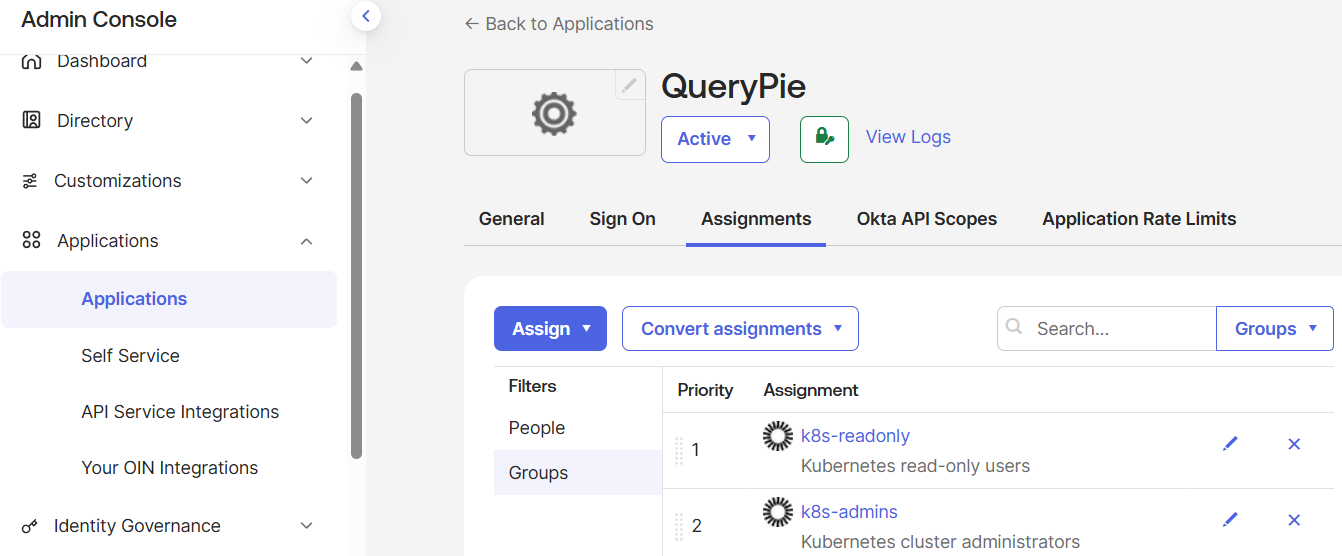


QueryPie 연동의 실제 흐름
[사용자]
   ↓ (Okta Dashboard 클릭)
QueryPie  ← 여기서만 People / Group 할당 필요
   ↓ (Redirect)
QueryPie-OIDC (OIDC Client)
   ↓
Okta Authorization Server
   ↓
ID Token / Access Token 발급 (groups 포함)
   ↓
QueryPie Backend


# README.md

## OIDC Application Integration (QueryPie Scenario)

- Okta를 Identity Provider(IdP)로 사용
- OIDC 기반 Application 생성
- 그룹 기반 App 접근제어 구현
- QueryPie 등 접근제어 솔루션 연동 가능한 구조 설계

'Okta+QueryPie+k8s' 카테고리의 다른 글

QueryPie ACP Community Edition 구축  (0) 2026.01.05
QueryPie 구축(K8s)  (0) 2025.12.31
Okta User 생성 + Group 맵핑 자동화  (0) 2025.12.29
Okta IAM 자동화  (1) 2025.12.29
opentofu 설치  (0) 2025.12.29
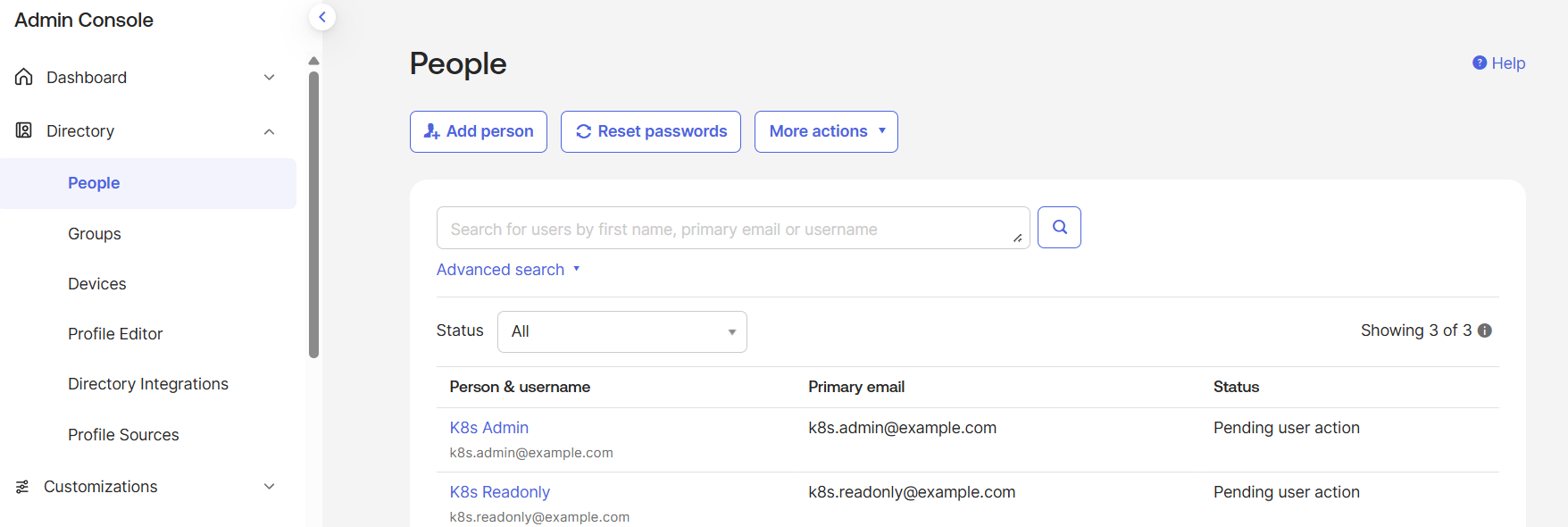
User 생성 및 Group 맵핑 자동화


# main.tf 에 아래 내용 추가

resource "okta_user" "user_admin" {
  first_name = "K8s"
  last_name  = "Admin"
  login      = "k8s.admin@example.com"
  email      = "k8s.admin@example.com"
}

resource "okta_user" "user_readonly" {
  first_name = "K8s"
  last_name  = "Readonly"
  login      = "k8s.readonly@example.com"
  email      = "k8s.readonly@example.com"
}
resource "okta_group_memberships" "admin_membership" {
  group_id = okta_group.k8s_admins.id
  users    = [okta_user.user_admin.id]
}

resource "okta_group_memberships" "readonly_membership" {
  group_id = okta_group.k8s_readonly.id
  users    = [okta_user.user_readonly.id]
}


# OpenToFu 실행

[root@k8s-master terraform-access-control]# tofu plan
okta_group.k8s_admins: Refreshing state... [id=00gypu0d5yYlmpq6d697]
okta_group.k8s_readonly: Refreshing state... [id=00gypu3w4aLdzWj86697]

OpenTofu used the selected providers to generate the following execution plan. Resource actions are indicated with the following symbols:
  + create

OpenTofu will perform the following actions:

  # okta_group_memberships.admin_membership will be created
  + resource "okta_group_memberships" "admin_membership" {
      + group_id        = "00gypu0d5yYlmpq6d697"
      + id              = (known after apply)
      + track_all_users = false
      + users           = (known after apply)
    }

  # okta_group_memberships.readonly_membership will be created
  + resource "okta_group_memberships" "readonly_membership" {
      + group_id        = "00gypu3w4aLdzWj86697"
      + id              = (known after apply)
      + track_all_users = false
      + users           = (known after apply)
    }

  # okta_user.user_admin will be created
  + resource "okta_user" "user_admin" {
      + custom_profile_attributes = (known after apply)
      + email                     = "k8s.admin@example.com"
      + expire_password_on_create = false
      + first_name                = "K8s"
      + id                        = (known after apply)
      + last_name                 = "Admin"
      + login                     = "k8s.admin@example.com"
      + raw_status                = (known after apply)
      + skip_roles                = false
      + status                    = "ACTIVE"
    }

  # okta_user.user_readonly will be created
  + resource "okta_user" "user_readonly" {
      + custom_profile_attributes = (known after apply)
      + email                     = "k8s.readonly@example.com"
      + expire_password_on_create = false
      + first_name                = "K8s"
      + id                        = (known after apply)
      + last_name                 = "Readonly"
      + login                     = "k8s.readonly@example.com"
      + raw_status                = (known after apply)
      + skip_roles                = false
      + status                    = "ACTIVE"
    }

Plan: 4 to add, 0 to change, 0 to destroy.
[root@k8s-master terraform-access-control]# tofu apply
okta_group.k8s_admins: Refreshing state... [id=00gypu0d5yYlmpq6d697]
okta_group.k8s_readonly: Refreshing state... [id=00gypu3w4aLdzWj86697]

OpenTofu used the selected providers to generate the following execution plan. Resource actions are indicated with the following symbols:
  + create

OpenTofu will perform the following actions:

  # okta_group_memberships.admin_membership will be created
  + resource "okta_group_memberships" "admin_membership" {
      + group_id        = "00gypu0d5yYlmpq6d697"
      + id              = (known after apply)
      + track_all_users = false
      + users           = (known after apply)
    }

  # okta_group_memberships.readonly_membership will be created
  + resource "okta_group_memberships" "readonly_membership" {
      + group_id        = "00gypu3w4aLdzWj86697"
      + id              = (known after apply)
      + track_all_users = false
      + users           = (known after apply)
    }

  # okta_user.user_admin will be created
  + resource "okta_user" "user_admin" {
      + custom_profile_attributes = (known after apply)
      + email                     = "k8s.admin@example.com"
      + expire_password_on_create = false
      + first_name                = "K8s"
      + id                        = (known after apply)
      + last_name                 = "Admin"
      + login                     = "k8s.admin@example.com"
      + raw_status                = (known after apply)
      + skip_roles                = false
      + status                    = "ACTIVE"
    }

  # okta_user.user_readonly will be created
  + resource "okta_user" "user_readonly" {
      + custom_profile_attributes = (known after apply)
      + email                     = "k8s.readonly@example.com"
      + expire_password_on_create = false
      + first_name                = "K8s"
      + id                        = (known after apply)
      + last_name                 = "Readonly"
      + login                     = "k8s.readonly@example.com"
      + raw_status                = (known after apply)
      + skip_roles                = false
      + status                    = "ACTIVE"
    }

Plan: 4 to add, 0 to change, 0 to destroy.

Do you want to perform these actions?
  OpenTofu will perform the actions described above.
  Only 'yes' will be accepted to approve.

  Enter a value: yes

okta_user.user_readonly: Creating...
okta_user.user_admin: Creating...
okta_user.user_readonly: Creation complete after 1s [id=00uyqkkr0zYwrqaiA697]
okta_user.user_admin: Creation complete after 1s [id=00uyqkipnrb2GMobo697]
okta_group_memberships.readonly_membership: Creating...
okta_group_memberships.admin_membership: Creating...
okta_group_memberships.admin_membership: Creation complete after 2s [id=00gypu0d5yYlmpq6d697]
okta_group_memberships.readonly_membership: Creation complete after 4s [id=00gypu3w4aLdzWj86697]

Apply complete! Resources: 4 added, 0 changed, 0 destroyed.


# Console 확인


# README.md

## User & Access Control Automation

- OpenTofu를 사용해 Okta 사용자 계정 자동 생성
- 역할 기반 그룹(k8s-admins / k8s-readonly) 설계
- 사용자 → 그룹 매핑 자동화
- 접근제어 정책을 그룹 중심으로 관리

'Okta+QueryPie+k8s' 카테고리의 다른 글

QueryPie ACP Community Edition 구축  (0) 2026.01.05
QueryPie 구축(K8s)  (0) 2025.12.31
Okta OIDC Application 생성  (0) 2025.12.30
Okta IAM 자동화  (1) 2025.12.29
opentofu 설치  (0) 2025.12.29
Okta 계정 준비

https://developer.okta.com


Home | Okta Developer

Integrator Free Plan available! The Integrator Free Plan org, designed for both developers and integrators, is now available! Existing Okta Developer Edition Service orgs will be deactivated starting on July 18, 2025. If you're an existing Okta Developer E

developer.okta.com

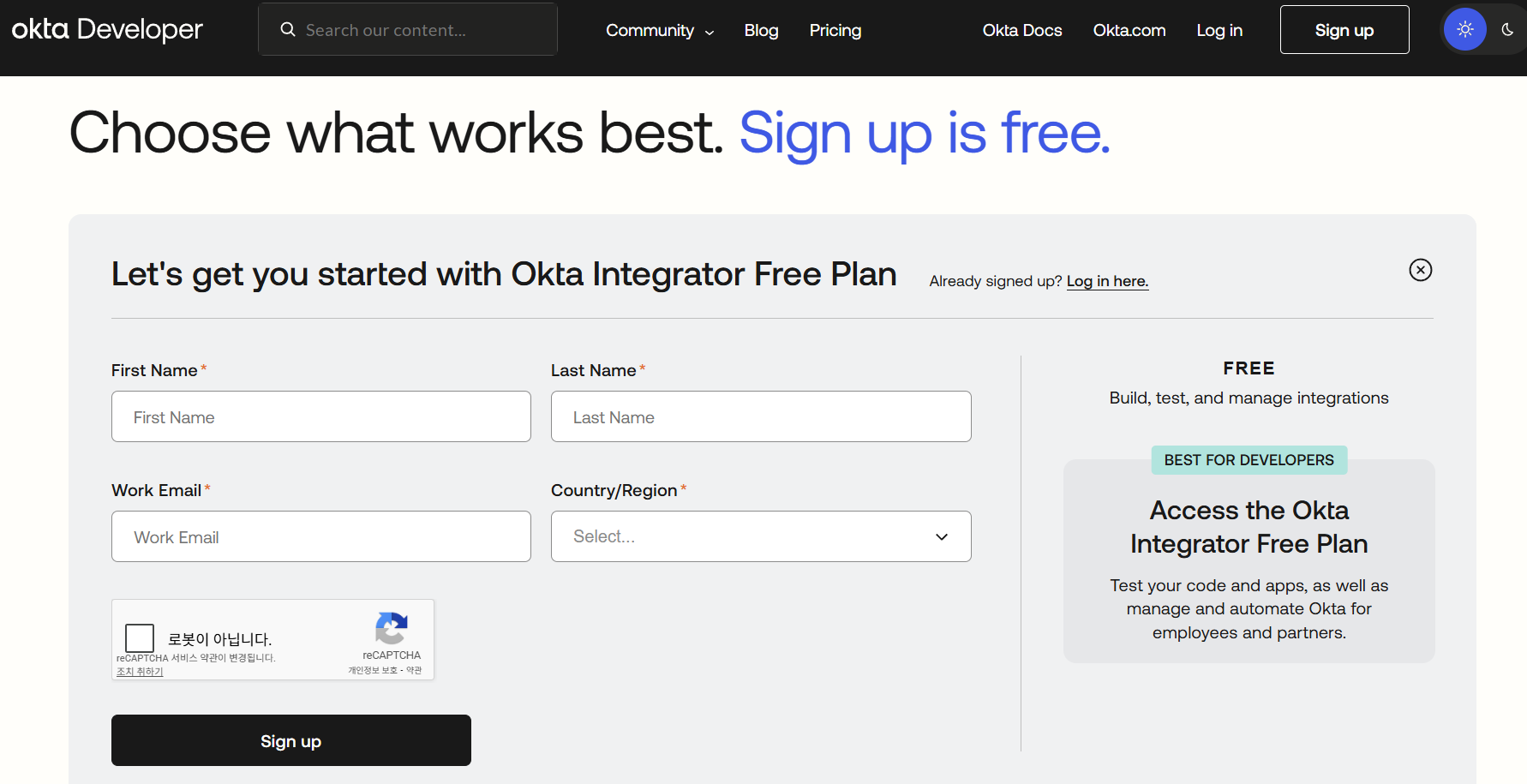
사이트에서 Sign Up을 통해 계정을 생성한다.

이때 Integrator Free Plan 으로 가입하면 된다.


여기서 개인적으로는 daum 메일만 성공했다.


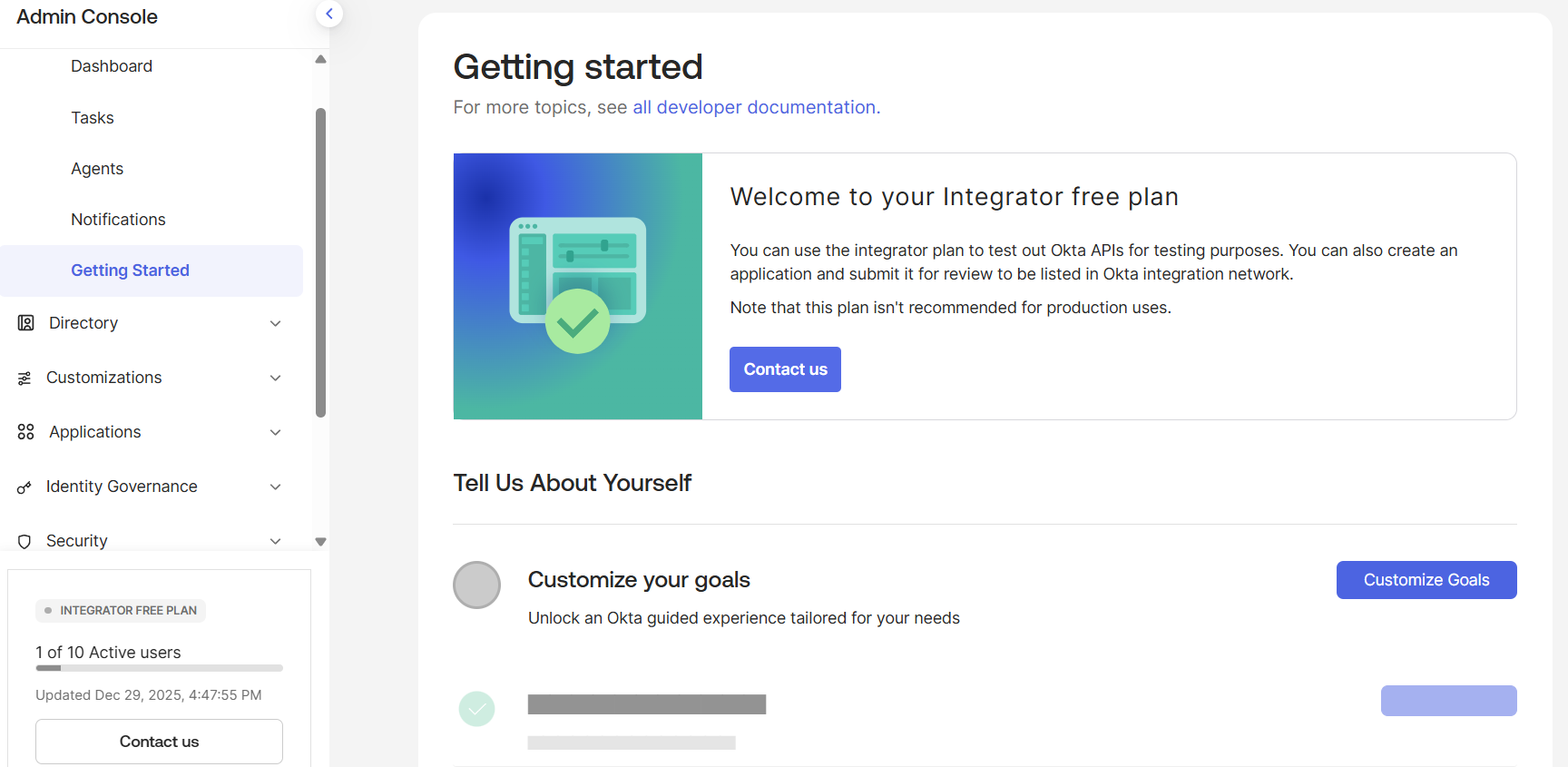
Applicaiton에 연동 후 로그인하면 아래와 같이 console 화면이 확인된다.


API Token 발급

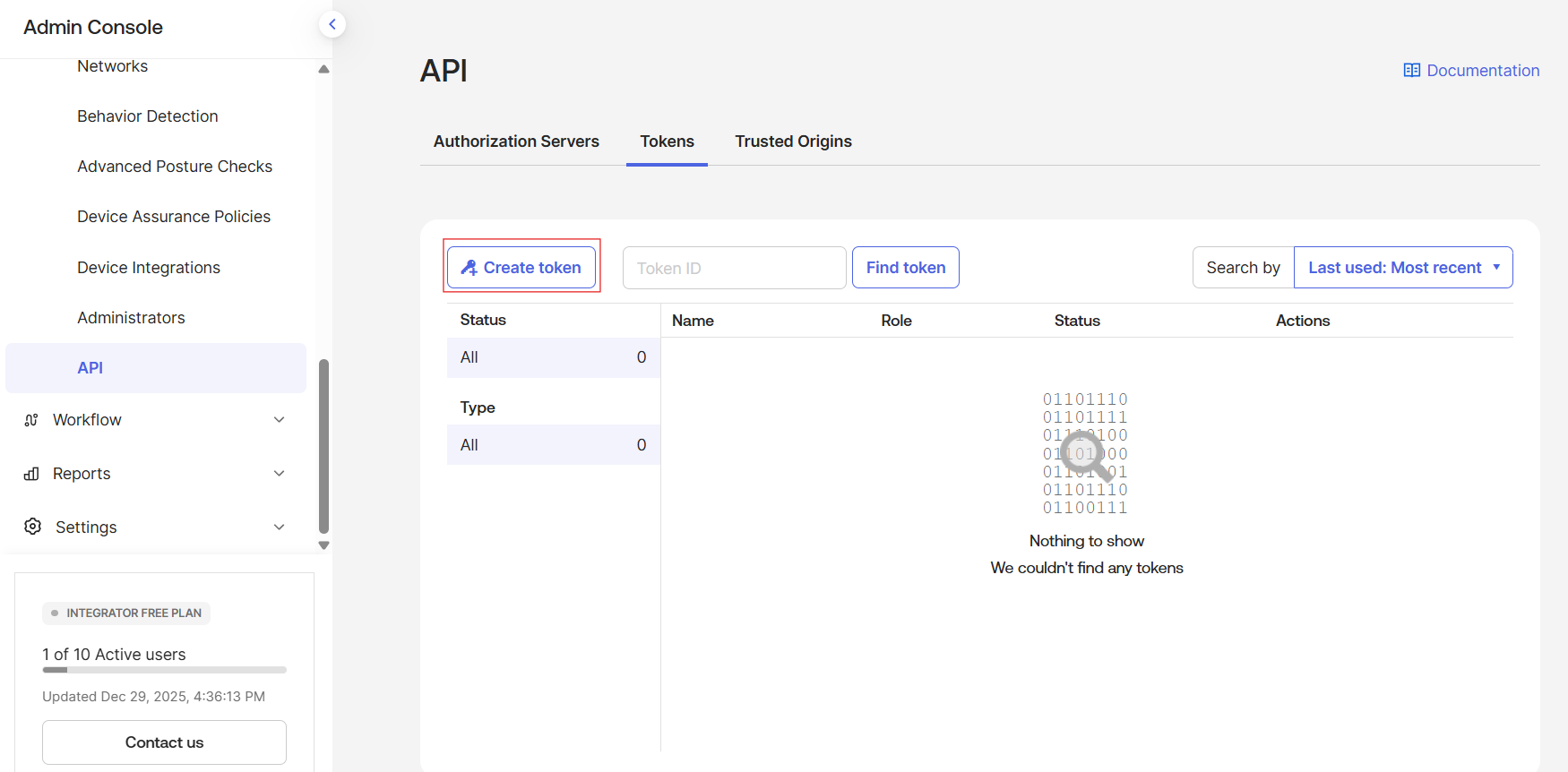
아래와 같이 Security → API → Tokens 에서 아래와 같이 Create token 버튼을 클릭하여 token을 생성한다.

이때 token 값을 기록해두어야 한다.


Okta Provider 연결

아래와 같이 새로 파일을 작성하여 연결 실습을 해보자.


# provider.tf

terraform {
  required_providers {
    okta = {
      source  = "okta/okta"
      version = "~> 4.0"
    }
  }
}

provider "okta" {
  org_name  = var.okta_org_name
  base_url  = var.okta_base_url
  api_token = var.okta_api_token
}


# variables.tf

variable "okta_org_name" {
  description = "Okta organization name (ex: dev-123456)"
  type        = string
}

variable "okta_base_url" {
  description = "Okta base url (okta.com or oktapreview.com)"
  type        = string
  default     = "okta.com"
}

variable "okta_api_token" {
  description = "Okta API token"
  type        = string
  sensitive   = true
}


# 환경변수 입력 

export TF_VAR_okta_org_name="integrator-XXXXXXX"
export TF_VAR_okta_api_token="XXX-XXXXXXXXXXXXXXXXXXXXXXXXXXXXXXXXx"


모두 준비되면 아래와 같이 연결이 잘 되는지 확인할 수 있다.

[root@k8s-master terraform-access-control]# rm -rf .terraform .terraform.lock.hcl
[root@k8s-master terraform-access-control]# tofu init
...
[root@k8s-master terraform-access-control]# tofu plan

No changes. Your infrastructure matches the configuration.

OpenTofu has compared your real infrastructure against your configuration and found no differences, so no changes are needed.


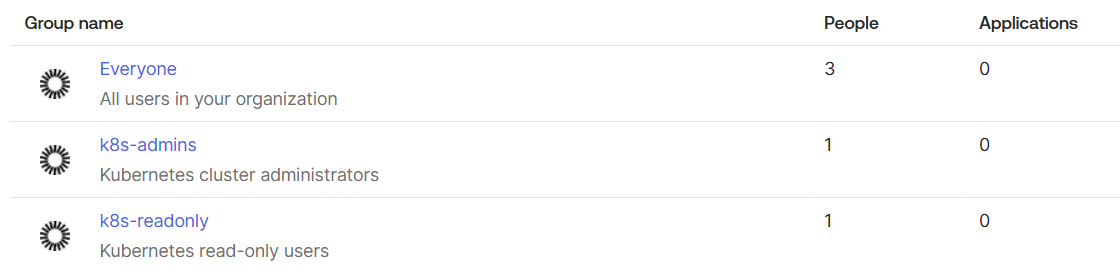
Okta 그룹 생성

연결이 확인되면 이제 group 리소스를 처음 만들어보자.


# main.tf

resource "okta_group" "k8s_admins" {
  name        = "k8s-admins"
  description = "Kubernetes cluster administrators"
}

resource "okta_group" "k8s_readonly" {
  name        = "k8s-readonly"
  description = "Kubernetes read-only users"
}


[root@k8s-master terraform-access-control]# tofu plan

OpenTofu used the selected providers to generate the following execution plan. Resource actions are indicated with the following symbols:
  + create

OpenTofu will perform the following actions:

  # okta_group.k8s_admins will be created
  + resource "okta_group" "k8s_admins" {
      + description = "Kubernetes cluster administrators"
      + id          = (known after apply)
      + name        = "k8s-admins"
      + skip_users  = false
    }

  # okta_group.k8s_readonly will be created
  + resource "okta_group" "k8s_readonly" {
      + description = "Kubernetes read-only users"
      + id          = (known after apply)
      + name        = "k8s-readonly"
      + skip_users  = false
    }

Plan: 2 to add, 0 to change, 0 to destroy.

─────────────────────────────────────────────────────────────────────────────────────────────────────────────────────────────────────────────────────────────────────────────────────────────────────────────────────────────────────

Note: You didn't use the -out option to save this plan, so OpenTofu can't guarantee to take exactly these actions if you run "tofu apply" now.
[root@k8s-master terraform-access-control]# tofu apply

OpenTofu used the selected providers to generate the following execution plan. Resource actions are indicated with the following symbols:
  + create

OpenTofu will perform the following actions:

  # okta_group.k8s_admins will be created
  + resource "okta_group" "k8s_admins" {
      + description = "Kubernetes cluster administrators"
      + id          = (known after apply)
      + name        = "k8s-admins"
      + skip_users  = false
    }

  # okta_group.k8s_readonly will be created
  + resource "okta_group" "k8s_readonly" {
      + description = "Kubernetes read-only users"
      + id          = (known after apply)
      + name        = "k8s-readonly"
      + skip_users  = false
    }

Plan: 2 to add, 0 to change, 0 to destroy.

Do you want to perform these actions?
  OpenTofu will perform the actions described above.
  Only 'yes' will be accepted to approve.

  Enter a value: yes

okta_group.k8s_admins: Creating...
okta_group.k8s_readonly: Creating...
okta_group.k8s_admins: Creation complete after 1s [id=00gypu0d5yYlmpq6d697]
okta_group.k8s_readonly: Creation complete after 1s [id=00gypu3w4aLdzWj86697]

Apply complete! Resources: 2 added, 0 changed, 0 destroyed.


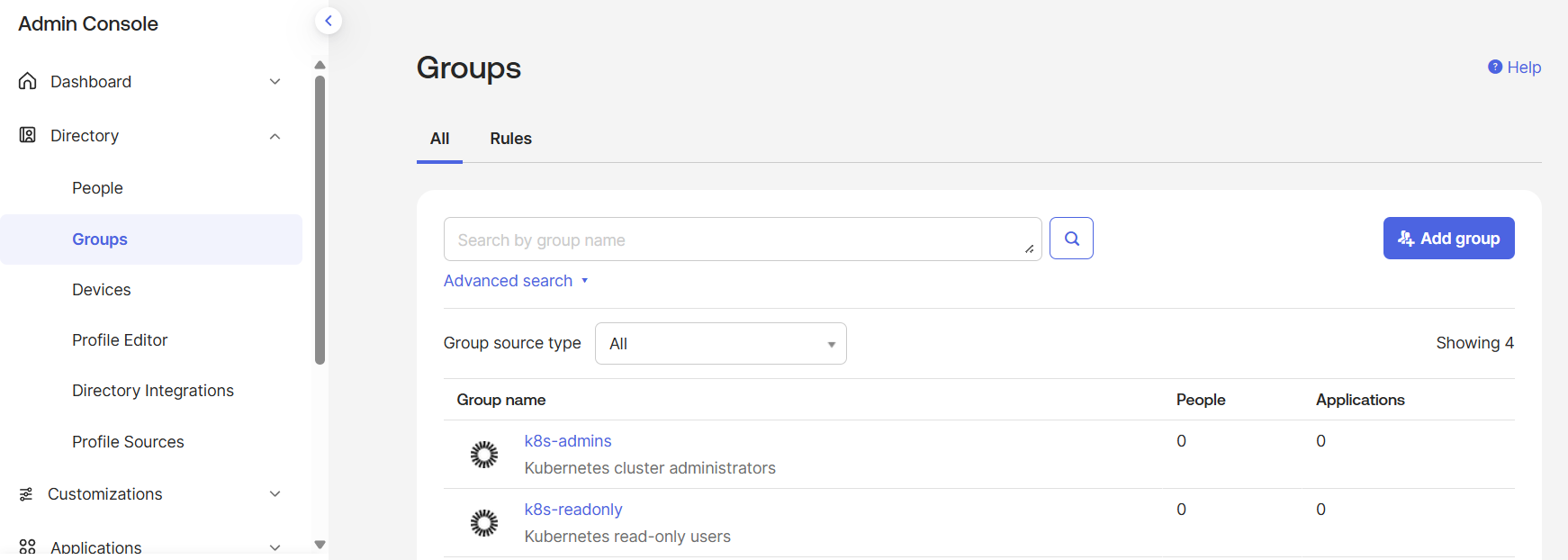
실행 후 UI에서 리소스가 생성됨을 확인할 수 있다.


# README.md

# Terraform(OpenTofu) 기반 Okta 접근제어 자동화 실습

## 목표
- Okta API를 활용해 접근제어 리소스를 IaC로 관리
- 엔터프라이즈 환경에서 서버/클러스터 접근 권한 자동화 구조 이해

## 구성
- Okta Integrator Free Plan
- OpenTofu (Terraform compatible)
- Okta Provider

## 구현 내용
- Okta Provider 연동
- 접근제어용 사용자 그룹 생성
- API Token 기반 자동화

'Okta+QueryPie+k8s' 카테고리의 다른 글

QueryPie ACP Community Edition 구축  (0) 2026.01.05
QueryPie 구축(K8s)  (0) 2025.12.31
Okta OIDC Application 생성  (0) 2025.12.30
Okta User 생성 + Group 맵핑 자동화  (0) 2025.12.29
opentofu 설치  (0) 2025.12.29

“온프레미스 Kubernetes 환경에서
Okta(IdP) + QueryPie(PAM)를 Terraform으로 구축·연동하고
운영 접근을 코드로 관리하는 프로젝트”

[ Terraform ]
     |
     |── Okta Provider
     |     ├─ User / Group
     |     ├─ App (OIDC)
     |
     |── QueryPie (API / 가정)
     |     ├─ Role
     |     ├─ Account
     |
     └── Kubernetes
           ├─ ServiceAccount
           ├─ RBAC
           └─ 접근 연동 (개념)


구축 대상 클러스터
[root@k8s-master ~]# k get no -o wide
NAME         STATUS   ROLES           AGE   VERSION   INTERNAL-IP   EXTERNAL-IP   OS-IMAGE                      KERNEL-VERSION                 CONTAINER-RUNTIME
k8s-master   Ready    control-plane   73d   v1.32.9   10.0.2.15     <none>        Rocky Linux 9.6 (Blue Onyx)   5.14.0-570.17.1.el9_6.x86_64   cri-o://1.30.14
k8s-node01   Ready    <none>          73d   v1.32.9   10.0.2.16     <none>        Rocky Linux 9.6 (Blue Onyx)   5.14.0-570.17.1.el9_6.x86_64   cri-o://1.30.14
k8s-node02   Ready    <none>          73d   v1.32.9   10.0.2.17     <none>        Rocky Linux 9.6 (Blue Onyx)   5.14.0-570.17.1.el9_6.x86_64   cri-o://1.30.14


terraform 설치

k8s-master 노드에서 아래와 같이 설치 진행(repo 문제로 바로 안되었으나 GPT에게 물어 간단히 해결됨)

dnf install -y dnf-plugins-core
dnf config-manager --add-repo https://packages.opentofu.org/opentofu.repo
dnf install -y opentofu


아래와 같이 설치 확인됨

[root@k8s-master ~]# tofu version
OpenTofu v1.10.3
on linux_amd64


디렉토리 생성
mkdir -p ~/terraform-access-control
cd ~/terraform-access-control


terraform 기본 파일 생성

생성한 디렉토리에 아래와 같이 기본 파일을 생성 후 tofu 명령어가 실행 가능한 지 확인하자


# versions.tf

terraform {
  required_version = ">= 1.5.0"

  required_providers {
    okta = {
      source  = "okta/okta"
      version = "~> 4.0"
    }
    kubernetes = {
      source  = "hashicorp/kubernetes"
      version = "~> 2.30"
    }
  }
}


# providers.tf

provider "okta" {
  org_name  = "dummy"
  base_url = "okta.com"
  api_token = "dummy"
}

provider "kubernetes" {
  config_path = "~/.kube/config"
}


# variables.tf

variable "environment" {
  description = "environment name"
  type        = string
  default     = "lab"
}


# main.tf

# Phase 1: intentionally empty


실행 확인
[root@k8s-master terraform-access-control]# tofu init

Initializing the backend...

Initializing provider plugins...
- Finding okta/okta versions matching "~> 4.0"...
- Finding hashicorp/kubernetes versions matching "~> 2.30"...
- Installing okta/okta v4.20.0...
- Installed okta/okta v4.20.0. Signature validation was skipped due to the registry not containing GPG keys for this provider
- Installing hashicorp/kubernetes v2.38.0...
- Installed hashicorp/kubernetes v2.38.0 (signed, key ID 0C0AF313E5FD9F80)

Providers are signed by their developers.
If you'd like to know more about provider signing, you can read about it here:
https://opentofu.org/docs/cli/plugins/signing/

OpenTofu has created a lock file .terraform.lock.hcl to record the provider
selections it made above. Include this file in your version control repository
so that OpenTofu can guarantee to make the same selections by default when
you run "tofu init" in the future.

OpenTofu has been successfully initialized!

You may now begin working with OpenTofu. Try running "tofu plan" to see
any changes that are required for your infrastructure. All OpenTofu commands
should now work.

If you ever set or change modules or backend configuration for OpenTofu,
rerun this command to reinitialize your working directory. If you forget, other
commands will detect it and remind you to do so if necessary.
[root@k8s-master terraform-access-control]# tofu plan

No changes. Your infrastructure matches the configuration.

OpenTofu has compared your real infrastructure against your configuration and found no differences, so no changes are needed.


'Okta+QueryPie+k8s' 카테고리의 다른 글

QueryPie ACP Community Edition 구축  (0) 2026.01.05
QueryPie 구축(K8s)  (0) 2025.12.31
Okta OIDC Application 생성  (0) 2025.12.30
Okta User 생성 + Group 맵핑 자동화  (0) 2025.12.29
Okta IAM 자동화  (1) 2025.12.29
참고문서

https://kubernetes.io/docs/concepts/workloads/autoscaling/vertical-pod-autoscale/


Vertical Pod Autoscaling

In Kubernetes, a VerticalPodAutoscaler automatically updates a workload management resource (such as a Deployment or StatefulSet), with the aim of automatically adjusting infrastructure resource requests and limits to match actual usage. Vertical scaling m

kubernetes.io

https://github.com/kubernetes/autoscaler/tree/master/vertical-pod-autoscaler


autoscaler/vertical-pod-autoscaler at master · kubernetes/autoscaler

Autoscaling components for Kubernetes. Contribute to kubernetes/autoscaler development by creating an account on GitHub.

github.com


VPA 설치

HPA와는 다르게 VPA는 별도 설치를 해야 사용이 가능하다.

git clone https://github.com/kubernetes/autoscaler.git
cd autoscaler/vertical-pod-autoscaler
./hack/vpa-up.sh


아래와 같이 설치여부를 확인

[root@k8s-master vertical-pod-autoscaler]# k get po -n kube-system | grep vpa
vpa-admission-controller-77f9b89f68-7dgkn   1/1     Running   0          115s
vpa-recommender-74477d86cf-h6dj8            1/1     Running   0          116s
vpa-updater-c4b976bd8-9rs6m                 1/1     Running   0          116s


아래 명령어로 각 파드의 에러 여부 확인 가능

kubectl --namespace=kube-system logs [pod name]| grep -e '^E[0-9]\{4\}'


VPA 실습

아래 yaml을 적용하여 VPA 생성

apiVersion: autoscaling.k8s.io/v1
kind: VerticalPodAutoscaler
metadata:
  name: hello-app
spec:
  targetRef:
    apiVersion: "apps/v1"
    kind: Deployment
    name: hello-app
  updatePolicy:
    updateMode: "Off"


추천 리소스가 확인되니 성공!

[root@k8s-master ~]# k describe vpa hello-app
Name:         hello-app
Namespace:    default
Labels:       <none>
Annotations:  <none>
API Version:  autoscaling.k8s.io/v1
Kind:         VerticalPodAutoscaler
Metadata:
  Creation Timestamp:  2025-12-26T02:36:50Z
  Generation:          1
  Resource Version:    216299
  UID:                 48e87a76-b0f2-4fb5-a8d4-5d56d52b948a
Spec:
  Target Ref:
    API Version:  apps/v1
    Kind:         Deployment
    Name:         hello-app
  Update Policy:
    Update Mode:  Off
Status:
  Conditions:
    Last Transition Time:  2025-12-26T0:37:03Z
    Status:                True
    Type:                  RecommendationProvided
  Recommendation:
    Container Recommendations:
      Container Name:  hello-app
      Lower Bound:
        Cpu:     25m
        Memory:  250Mi
      Target:
        Cpu:     25m
        Memory:  250Mi
      Uncapped Target:
        Cpu:     25m
        Memory:  250Mi
      Upper Bound:
        Cpu:     193m
        Memory:  414455793


아래와 같이 updateMode를 바꿔 적용해보자

  updatePolicy:
    updateMode: "Auto"


Auto는 deprecated 될 것임을 알 수 있었다.

[root@k8s-master ~]# k apply -f vpa.yaml
Warning: UpdateMode "Auto" is deprecated and will be removed in a future API version. Use explicit update modes like "Recreate", "Initial", or "InPlaceOrRecreate" instead. See https://github.com/kubernetes/autoscaler/issues/8424 for more details.
verticalpodautoscaler.autoscaling.k8s.io/hello-app configured


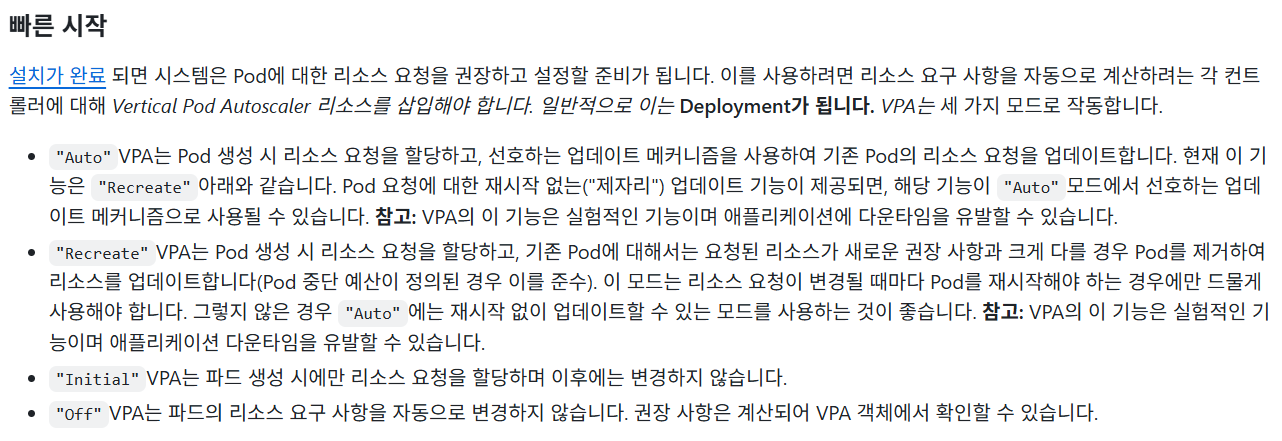
추가로 각 mode에 대한 설명을 github에서 아래와 같이 확인할 수 있었다.

Auto와 InPlaceOrRecreate는 결국 같은 모드이지만 의미의 명확성을 위해 이름을 바꾼 것 같다.


아래와 같이 InPlaceOrRecreate도 잘 적용됨을 확인할 수 있다.

[root@k8s-master ~]# k get vpa
NAME        MODE                CPU   MEM     PROVIDED   AGE
hello-app   InPlaceOrRecreate   25m   250Mi   True       3h3m


또한 추천하는 리소스대로 파드도 재생성되었다.

여기서 Upper Bound가 limit에 적용될 것을 기대했지만 적용되지는 않았다.

[root@k8s-master ~]# k get deploy hello-app -o jsonpath="{.spec.template.spec.containers[*].resources}"
{"requests":{"cpu":"100m","memory":"200Mi"}}

[root@k8s-master ~]# k get po
NAME                          READY   STATUS      RESTARTS   AGE
hello-app-76f76c9cc8-bl6qh    1/1     Running     0          40m
hello-app-76f76c9cc8-z8992    1/1     Running     0          41m

[root@k8s-master ~]# k get po hello-app-76f76c9cc8-bl6qh -o jsonpath="{.spec.containers[*].resources}"
{"requests":{"cpu":"25m","memory":"250Mi"}}

[root@k8s-master ~]# k get po hello-app-76f76c9cc8-z8992 -o jsonpath="{.spec.containers[*].resources}"
{"requests":{"cpu":"25m","memory":"250Mi"}}


부하 테스트

HPA에서 적용했던 부하 테스트를 진행 시 아래와 같이 Histogram이 측정되었다.

[root@k8s-master ~]# k describe vpacheckpoint hello-app-hello-app
Name:         hello-app-hello-app
Namespace:    default
Labels:       <none>
Annotations:  <none>
API Version:  autoscaling.k8s.io/v1
Kind:         VerticalPodAutoscalerCheckpoint
Metadata:
  Creation Timestamp:  2025-12-26T02:37:02Z
  Generation:          167
  Resource Version:    236405
  UID:                 106ad508-c1c1-4aa9-9e8f-8f63d461d0f2
Spec:
  Container Name:   hello-app
  Vpa Object Name:  hello-app
Status:
  Cpu Histogram:
    Bucket Weights:
      0:                  10000
      1:                  272
      10:                 30
      13:                 30
      2:                  303
      3:                  91
      4:                  30
      5:                  182
      6:                  61
      7:                  61
      8:                  122
      9:                  61
    Reference Timestamp:  2025-12-26T00:00:00Z
    Total Weight:         43.054345325212154
  First Sample Start:     2025-12-26T02:09:49Z
  Last Sample Start:      2025-12-26T05:22:51Z
  Last Update Time:       2025-12-26T05:23:03Z
  Memory Histogram:
    Bucket Weights:
      1:                  10000
      6:                  6844
    Reference Timestamp:  2025-12-27T00:00:00Z
    Total Weight:         5.5309391895116535
  Total Samples Count:    386
  Version:                v3
Events:                   <none>


이에 따라 Upper Bound가 수정된 것도 확인 가능하다.

[root@k8s-master ~]# k describe vpa hello-app
Name:         hello-app
Namespace:    default
Labels:       <none>
Annotations:  <none>
API Version:  autoscaling.k8s.io/v1
Kind:         VerticalPodAutoscaler
Metadata:
  Creation Timestamp:  2025-12-26T02:36:50Z
  Generation:          4
  Resource Version:    237418
  UID:                 48e87a76-b0f2-4fb5-a8d4-5d56d52b948a
Spec:
  Target Ref:
    API Version:  apps/v1
    Kind:         Deployment
    Name:         hello-app
  Update Policy:
    Update Mode:  Recreate
Status:
  Conditions:
    Last Transition Time:  2025-12-26T02:37:03Z
    Status:                True
    Type:                  RecommendationProvided
  Recommendation:
    Container Recommendations:
      Container Name:  hello-app
      Lower Bound:
        Cpu:     25m
        Memory:  250Mi
      Target:
        Cpu:     25m
        Memory:  250Mi
      Uncapped Target:
        Cpu:     25m
        Memory:  250Mi
      Upper Bound:
        Cpu:     405m
        Memory:  775174755

'k8s' 카테고리의 다른 글

Cilium 설치  (0) 2026.02.03
HPA  (0) 2025.12.15
metric server 설치  (0) 2025.09.02
node join 및 delete  (0) 2025.08.28
ansible 을 활용한 k8s 클러스터 구축  (0) 2025.08.01
참고문서

https://kubernetes.io/ko/docs/tasks/run-application/horizontal-pod-autoscale/


Horizontal Pod Autoscaling

쿠버네티스에서, HorizontalPodAutoscaler 는 워크로드 리소스(예: 디플로이먼트 또는 스테이트풀셋)를 자동으로 업데이트하며, 워크로드의 크기를 수요에 맞게 자동으로 스케일링하는 것을 목표로 한

kubernetes.io


HPA 생성
[root@k8s-master ~]# k autoscale deployment hello-app --cpu-percent 80 --min 2 --max 5


생성 확인
[root@k8s-master ~]# k get hpa
NAME        REFERENCE              TARGETS              MINPODS   MAXPODS   REPLICAS   AGE
hello-app   Deployment/hello-app   cpu: <unknown>/80%   2         5         2          3d5h

metric을 측정하지 못 하는 것이 발견됨


Log 확인
Events:
  Type     Reason                   Age                     From                       Message
  ----     ------                   ----                    ----                       -------
  Warning  FailedGetResourceMetric  52m (x30 over 124m)     horizontal-pod-autoscaler  failed to get cpu utilization: missing request for cpu in container hello-app of Pod hello-app-6c5887b5f-fslmh
  Warning  FailedGetResourceMetric  2m12s (x440 over 127m)  horizontal-pod-autoscaler  failed to get cpu utilization: missing request for cpu in container hello-app of Pod hello-app-6c5887b5f-bs5xr

그래서 deployment의 resource에 아래와 같이 requests를 설정해야 한다


requests cpu 추가
spec:
  template:
    spec:
      containers:
        resources:
          requests:
            cpu: "100m"


metric 확인
[root@k8s-master ~]# k get hpa
NAME        REFERENCE              TARGETS       MINPODS   MAXPODS   REPLICAS   AGE
hello-app   Deployment/hello-app   cpu: 1%/80%   2         5         2          3d5h


HPA  yaml

memory까지 임계치와 metric을 수집할 수 있도록 아래와 같이 HPA yaml 수정

apiVersion: autoscaling/v2
kind: HorizontalPodAutoscaler
metadata:
  name: hello-app
  namespace: default
spec:
  scaleTargetRef:
    apiVersion: apps/v1
    kind: Deployment
    name: hello-app
  minReplicas: 2
  maxReplicas: 5
  metrics:
  - type: Resource
    resource:
      name: cpu
      target:
        type: Utilization
        averageUtilization: 80
  - type: Resource
    resource:
      name: memory
      target:
        type: Utilization
        averageUtilization: 70


확인
[root@k8s-master ~]# k get hpa
NAME        REFERENCE              TARGETS                              MINPODS   MAXPODS   REPLICAS   AGE
hello-app   Deployment/hello-app   cpu: 1%/80%, memory: <unknown>/70%   2         5         2          3d5h

CPU와 동일하게 memory도 metric이 수집되도록 requests 추가해주면 아래와 같이 metric이 확인됨


[root@k8s-master ~]# k get hpa
NAME        REFERENCE              TARGETS                       MINPODS   MAXPODS   REPLICAS   AGE
hello-app   Deployment/hello-app   cpu: 1%/80%, memory: 1%/70%   2         5         2          3d5h


부하테스트

# 스크립트 작성

cat << 'EOF' > k6-hello.js
import http from 'k6/http';
import { sleep } from 'k6';

export let options = {
  stages: [
    { duration: '1m', target: 100 },   // 워밍업
    { duration: '3m', target: 700 },  // 부하 증가
    { duration: '3m', target: 5000 },  // 강한 부하
    { duration: '2m', target: 0 },    // 종료
  ],
};

export default function () {
  http.get('http://hello-app.default.svc.cluster.local');
  sleep(1);
}
EOF


# configmap 생성

kubectl create configmap k6-script --from-file=k6-hello.js


# k6 yaml 생성

cat << 'EOF' > k6-job.yaml
apiVersion: batch/v1
kind: Job
metadata:
  name: k6-hello-test
spec:
  backoffLimit: 0
  template:
    spec:
      restartPolicy: Never
      containers:
      - name: k6
        image: grafana/k6:latest
        command: ["k6", "run", "/scripts/k6-hello.js"]
        volumeMounts:
        - name: k6-script
          mountPath: /scripts
      volumes:
      - name: k6-script
        configMap:
          name: k6-script
EOF


# job 생성

kubectl apply -f k6-job.yaml


#결과 확인

[root@k8s-master ~]# k get job
NAME            STATUS     COMPLETIONS   DURATION   AGE
k6-hello-test   Complete   1/1           9m20s      10m

k6 job이 완료되는 동안의 기록을 아래와 얻었다

기록을 확인하면 알 수 있는 것과 같이 부하가 임계치를 넘어 최대 pod 수인 5까지 생성되었다가,

job이 모두 끝난 후 시간이 지나자 최소 pod 수인 2로 다시 원복되는 것을 확인하였다.


[root@k8s-master ~]# k get hpa -w
NAME        REFERENCE              TARGETS                       MINPODS   MAXPODS   REPLICAS   AGE
hello-app   Deployment/hello-app   cpu: 1%/80%, memory: 7%/70%   2         5         2          11d
hello-app   Deployment/hello-app   cpu: 4%/80%, memory: 7%/70%   2         5         2          11d
hello-app   Deployment/hello-app   cpu: 6%/80%, memory: 7%/70%   2         5         2          11d
hello-app   Deployment/hello-app   cpu: 8%/80%, memory: 7%/70%   2         5         2          11d
hello-app   Deployment/hello-app   cpu: 11%/80%, memory: 7%/70%   2         5         2          11d
hello-app   Deployment/hello-app   cpu: 15%/80%, memory: 7%/70%   2         5         2          11d
hello-app   Deployment/hello-app   cpu: 19%/80%, memory: 7%/70%   2         5         2          11d
hello-app   Deployment/hello-app   cpu: 24%/80%, memory: 7%/70%   2         5         2          11d
hello-app   Deployment/hello-app   cpu: 28%/80%, memory: 7%/70%   2         5         2          11d
hello-app   Deployment/hello-app   cpu: 32%/80%, memory: 7%/70%   2         5         2          11d
hello-app   Deployment/hello-app   cpu: 35%/80%, memory: 7%/70%   2         5         2          11d
hello-app   Deployment/hello-app   cpu: 38%/80%, memory: 8%/70%   2         5         2          11d
hello-app   Deployment/hello-app   cpu: 40%/80%, memory: 8%/70%   2         5         2          11d
hello-app   Deployment/hello-app   cpu: 39%/80%, memory: 9%/70%   2         5         2          11d
hello-app   Deployment/hello-app   cpu: 42%/80%, memory: 9%/70%   2         5         2          11d
hello-app   Deployment/hello-app   cpu: 45%/80%, memory: 9%/70%   2         5         2          11d
hello-app   Deployment/hello-app   cpu: 68%/80%, memory: 12%/70%   2         5         2          11d
hello-app   Deployment/hello-app   cpu: 85%/80%, memory: 14%/70%   2         5         2          11d
hello-app   Deployment/hello-app   cpu: 97%/80%, memory: 17%/70%   2         5         2          11d
hello-app   Deployment/hello-app   cpu: 103%/80%, memory: 19%/70%   2         5         3          11d
hello-app   Deployment/hello-app   cpu: 107%/80%, memory: 21%/70%   2         5         3          11d
hello-app   Deployment/hello-app   cpu: 83%/80%, memory: 16%/70%    2         5         3          11d
hello-app   Deployment/hello-app   cpu: 92%/80%, memory: 19%/70%    2         5         3          11d
hello-app   Deployment/hello-app   cpu: 105%/80%, memory: 21%/70%   2         5         4          11d
hello-app   Deployment/hello-app   cpu: 102%/80%, memory: 16%/70%   2         5         4          11d
hello-app   Deployment/hello-app   cpu: 87%/80%, memory: 18%/70%    2         5         4          11d
hello-app   Deployment/hello-app   cpu: 95%/80%, memory: 19%/70%    2         5         4          11d
hello-app   Deployment/hello-app   cpu: 96%/80%, memory: 20%/70%    2         5         5          11d
hello-app   Deployment/hello-app   cpu: 89%/80%, memory: 17%/70%    2         5         5          11d
hello-app   Deployment/hello-app   cpu: 64%/80%, memory: 17%/70%    2         5         5          11d
hello-app   Deployment/hello-app   cpu: 47%/80%, memory: 17%/70%    2         5         5          11d
hello-app   Deployment/hello-app   cpu: 37%/80%, memory: 17%/70%    2         5         5          11d
hello-app   Deployment/hello-app   cpu: 30%/80%, memory: 17%/70%    2         5         5          11d
hello-app   Deployment/hello-app   cpu: 21%/80%, memory: 17%/70%    2         5         5          11d
hello-app   Deployment/hello-app   cpu: 15%/80%, memory: 17%/70%    2         5         5          11d
hello-app   Deployment/hello-app   cpu: 6%/80%, memory: 17%/70%     2         5         5          11d
hello-app   Deployment/hello-app   cpu: 2%/80%, memory: 16%/70%     2         5         5          11d
hello-app   Deployment/hello-app   cpu: 1%/80%, memory: 16%/70%     2         5         5          11d
hello-app   Deployment/hello-app   cpu: 1%/80%, memory: 20%/70%     2         5         4          11d
hello-app   Deployment/hello-app   cpu: 1%/80%, memory: 24%/70%     2         5         3          11d
hello-app   Deployment/hello-app   cpu: 1%/80%, memory: 30%/70%     2         5         2          11d
[root@k8s-master ~]# k get po -w
NAME                          READY   STATUS              RESTARTS   AGE
hello-app-76f76c9cc8-dkfks    1/1     Running             1          7d22h
hello-app-76f76c9cc8-xv6bc    1/1     Running             1          7d22h
k6-hello-test-nrf67           0/1     ContainerCreating   0          6s
test-nginx-684bb88ff4-pg9xl   1/1     Running             2          33d
k6-hello-test-nrf67           1/1     Running             0          12s
hello-app-76f76c9cc8-wczgb    0/1     Pending             0          0s
hello-app-76f76c9cc8-wczgb    0/1     ContainerCreating   0          0s
hello-app-76f76c9cc8-wczgb    1/1     Running             0          2s
hello-app-76f76c9cc8-w7n49    0/1     Pending             0          0s
hello-app-76f76c9cc8-w7n49    0/1     ContainerCreating   0          0s
hello-app-76f76c9cc8-w7n49    1/1     Running             0          1s
hello-app-76f76c9cc8-bdjch    0/1     Pending             0          0s
hello-app-76f76c9cc8-bdjch    0/1     ContainerCreating   0          0s
hello-app-76f76c9cc8-bdjch    1/1     Running             0          2s
k6-hello-test-nrf67           0/1     Completed           0          9m18s
hello-app-76f76c9cc8-bdjch    1/1     Terminating         0          5m31s
hello-app-76f76c9cc8-bdjch    0/1     Error               0          5m31s
hello-app-76f76c9cc8-bdjch    0/1     Error               0          5m32s
hello-app-76f76c9cc8-w7n49    1/1     Terminating         0          6m46s
hello-app-76f76c9cc8-w7n49    0/1     Error               0          6m46s
hello-app-76f76c9cc8-wczgb    1/1     Terminating         0          8m16s
hello-app-76f76c9cc8-wczgb    0/1     Error               0          8m16s
hello-app-76f76c9cc8-wczgb    0/1     Error               0          8m17s
[root@k8s-master ~]# k get deploy
NAME         READY   UP-TO-DATE   AVAILABLE   AGE
hello-app    5/5     5            5           67d
test-nginx   1/1     1            1           55d
[root@k8s-master ~]#
[root@k8s-master ~]#
[root@k8s-master ~]# k get po
NAME                          READY   STATUS      RESTARTS   AGE
hello-app-76f76c9cc8-dkfks    1/1     Running     1          7d22h
hello-app-76f76c9cc8-w7n49    1/1     Running     0          6m37s
hello-app-76f76c9cc8-wczgb    1/1     Running     0          7m37s
hello-app-76f76c9cc8-xv6bc    1/1     Running     1          7d22h
k6-hello-test-nrf67           0/1     Completed   0          12m
test-nginx-684bb88ff4-pg9xl   1/1     Running     2          33d
[root@k8s-master ~]# k get po
NAME                          READY   STATUS      RESTARTS   AGE
hello-app-76f76c9cc8-dkfks    1/1     Running     1          7d22h
hello-app-76f76c9cc8-xv6bc    1/1     Running     1          7d22h
k6-hello-test-nrf67           0/1     Completed   0          13m
test-nginx-684bb88ff4-pg9xl   1/1     Running     2          33d
[root@k8s-master ~]# k get deploy
NAME         READY   UP-TO-DATE   AVAILABLE   AGE
hello-app    2/2     2            2           67d
test-nginx   1/1     1            1           55d
[root@k8s-master ~]#


이외에도 HPA를 활용하는 다양한 방법이 있는 것 같다.

외부와 연결한다든지 파드와 연결한다든지 metric을 다양하게 쓸 수 있다한다.

추후에 관련해서 보충 블로깅을 하고싶기는 하다.

'k8s' 카테고리의 다른 글

Cilium 설치  (0) 2026.02.03
VPA  (0) 2025.12.24
metric server 설치  (0) 2025.09.02
node join 및 delete  (0) 2025.08.28
ansible 을 활용한 k8s 클러스터 구축  (0) 2025.08.01

+ Recent posts